

AirTV delivers free local channels to your TV without monthly fees. You buy the hardware once and watch ABC, CBS, NBC, FOX, PBS, and dozens of other channels in HD forever.
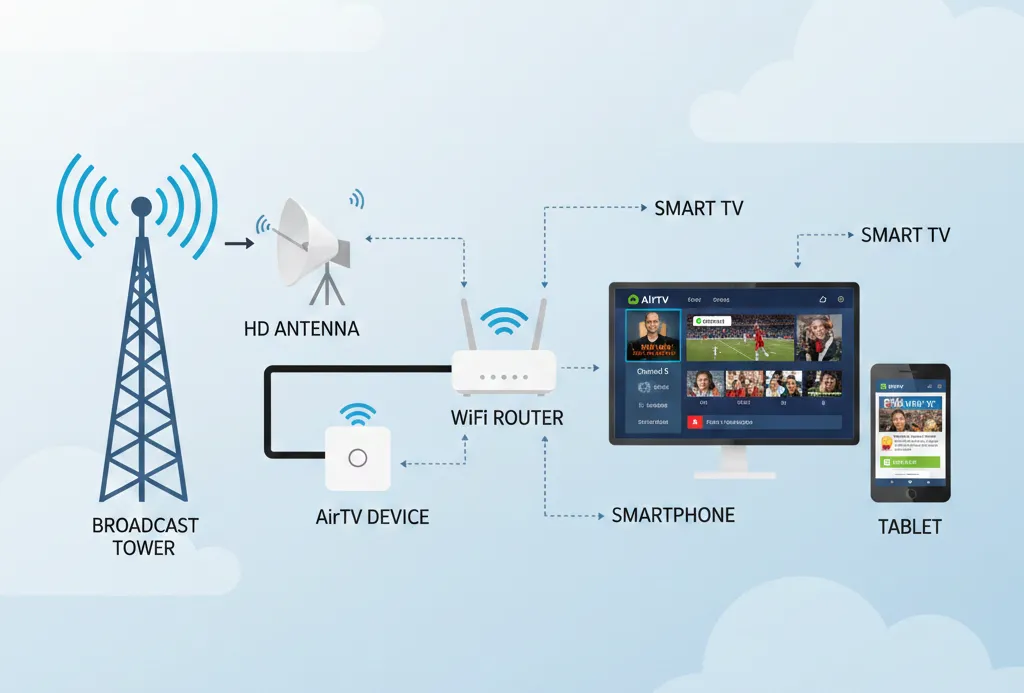
The system works through over-the-air broadcast signals. You connect an HD antenna to an AirTV device, and it streams channels to any screen in your home. No cable subscription required.
This guide covers every channel you can watch for free, the three AirTV devices available in 2026, exact pricing, and which antenna you need for your location.
What is AirTV? Understanding the Basics
AirTV is a streaming device that captures free broadcast TV signals and distributes them throughout your home. It partners with Sling TV but does not require a Sling subscription to access local channels.
Traditional cable companies charge $8 to $12 per month for local channels. AirTV eliminates this fee. You pay once for the device and antenna, then watch free forever.
The device connects to your home WiFi network. Once connected, you can watch local channels on smart TVs, phones, tablets, and streaming sticks using the free Sling app.
Key fact: Sling TV integration is optional. You can use AirTV to watch only free local channels without paying for any streaming service.
The technology relies on broadcast towers that transmit signals for free. The FCC mandates these signals remain free and accessible to anyone with an antenna. AirTV simply makes accessing these signals easier across multiple devices.
Free Local Channels Available on AirTV
Major Networks You Can Watch for Free
AirTV provides access to all major broadcast networks:
ABC broadcasts local news, World News Tonight, Grey’s Anatomy, The Bachelor, Good Morning America, and prime-time programming.
CBS airs 60 Minutes, NFL games, NCIS, The Price is Right, and NCAA March Madness.
NBC shows The Voice, Sunday Night Football, Chicago Fire, Today Show, and Olympic coverage.
FOX features NFL games, The Masked Singer, 9-1-1, local news, and MLB playoffs.
PBS offers Masterpiece, Nova, Antiques Roadshow, and educational children’s programming.
The CW broadcasts The Flash, Superman & Lois, and other network shows.
Beyond the major networks, most locations receive additional channels:
- Independent stations
- MeTV (classic TV shows)
- Antenna TV (retro programming)
- Comet (sci-fi movies and shows)
- Grit (western films)
- Bounce (African American programming)
- Court TV
- Ion Television
- TBD
- Laff (comedy programming)
How Many Channels Can You Get?
Channel counts vary by location and signal strength.
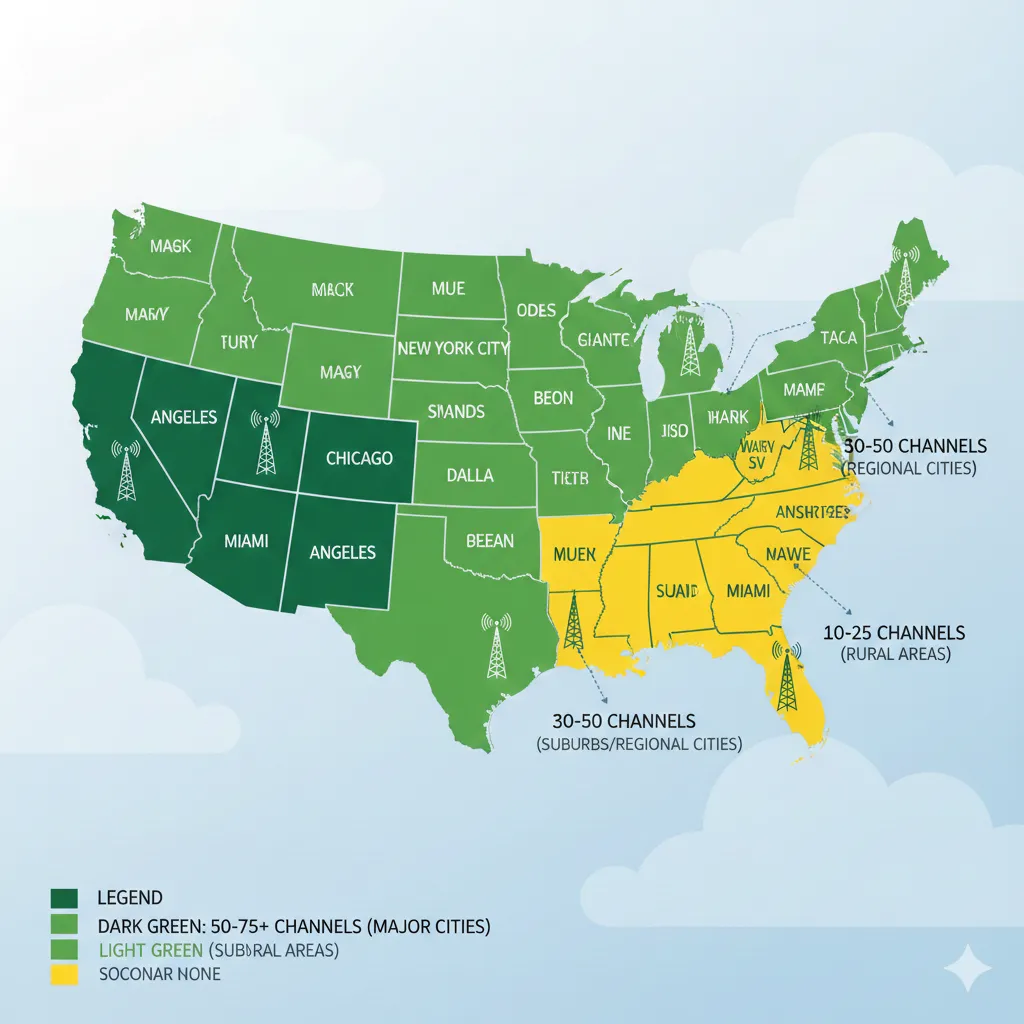
Major cities (Los Angeles, New York, Chicago, Dallas, Houston): 50 to 75 channels Suburban areas within 25 miles of broadcast towers: 30 to 50 channels Rural locations more than 50 miles from towers: 10 to 25 channels
These numbers include sub-channels. A single station often broadcasts multiple channels. NBC 4.1 might have 4.2, 4.3, and 4.4 as additional channels with different programming.
Philadelphia users typically receive 62 channels. Phoenix averages 48 channels. Seattle users get around 42 channels. San Antonio provides 38 channels on average.
The actual count depends on four factors: distance from broadcast towers, terrain between you and towers, antenna type, and antenna placement.
Channel Availability by Location
Every US location falls into a Designated Market Area (DMA). The DMA determines which local affiliates broadcast in your region.
Los Angeles DMA covers ABC 7, CBS 2, NBC 4, FOX 11, KTLA 5, and dozens more. Miami DMA includes different station numbers for the same networks.
Signal strength factors:
Distance matters most. Broadcast signals travel 40 to 70 miles reliably. Beyond 70 miles, reception becomes unpredictable.
Terrain blocks signals. Mountains, hills, and tall buildings create dead zones. Flat terrain allows signals to travel farther.
Building materials affect indoor reception. Metal roofs and siding block signals. Brick walls reduce signal strength by 30 to 50 percent.
Weather rarely impacts digital TV signals. Rain and snow do not cause the static seen with old analog signals. Digital signals either work or don’t work.
To check channels in your area:
Visit AirTV.net and enter your address in the channel finder tool. The tool uses FCC data and the Longley-Rice propagation model to predict available channels.
The Federal Communications Commission maintains a database at fcc.gov/media/engineering/dtvmaps showing every broadcast tower location and coverage area.
AirTV Devices: Complete Comparison & Pricing (2026)
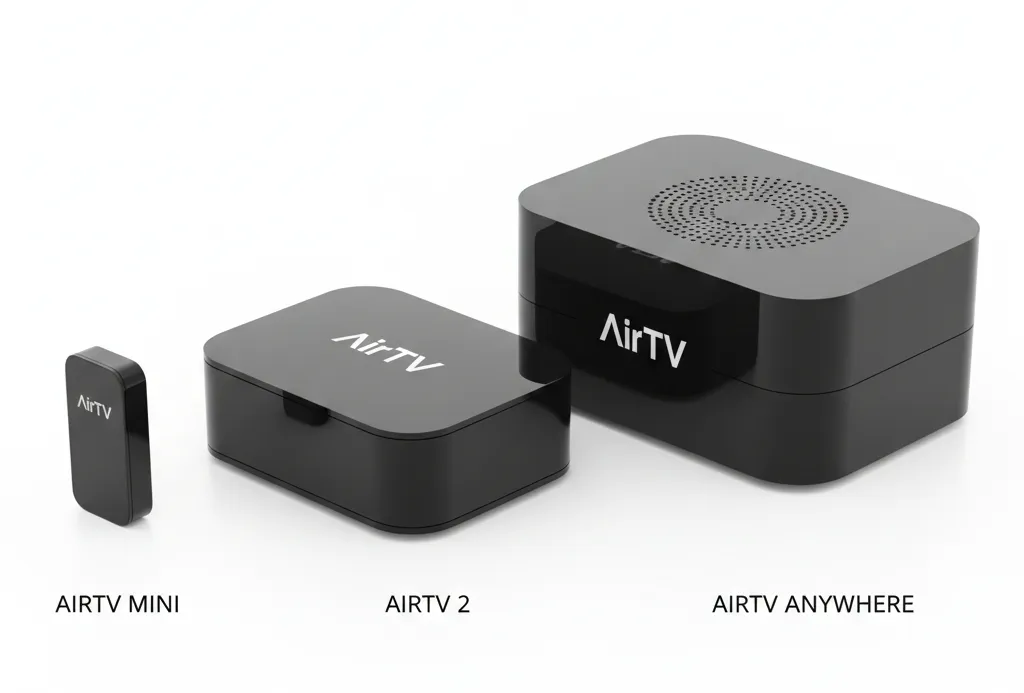
AirTV Mini ($79.99)
The Mini serves as a 4K streaming stick with Google Play access and Chromecast built-in.
Specifications:
- No built-in tuner (requires separate AirTV, AirTV 2, or AirTV Anywhere to view local channels)
- 4K resolution support
- Bluetooth remote included
- WiFi connectivity
- HDMI connection
Best for: Single TV viewing with existing AirTV hardware or users who want 4K streaming capabilities combined with Sling TV.
Current pricing: Free when you prepay for 2 months of Sling TV ($80), or $79.99 standalone.
AirTV 2 ($49 to $149)
The AirTV 2 includes a dual-tuner system that lets two people watch different channels simultaneously.
Specifications:
- Dual-tuner (2 simultaneous streams)
- DVR capable with external hard drive (not included)
- WiFi and Ethernet connectivity
- Streams to unlimited devices
- HD quality output
- Includes coaxial antenna input
Best for: Households with 2 to 3 TVs wanting DVR capability without monthly DVR fees.
Current pricing: $49 with current Sling TV promotion, or $149 standalone. The promotional price requires no Sling subscription commitment after the initial period.
DVR requirements: You must purchase a USB external hard drive separately. Supported capacities range from 50GB to 2TB. A 500GB drive holds approximately 75 hours of HD programming. A 1TB drive stores 150 hours. A 2TB drive accommodates 300 hours.
AirTV Anywhere ($99 to $199)
The Anywhere model features a quad-tuner system and built-in 1TB DVR storage.
Specifications:
- Quad-tuner (4 simultaneous streams)
- Built-in 1TB DVR (no external drive needed)
- 150 hours of HD recording capacity
- WiFi and Ethernet connectivity
- Streams to unlimited devices in-home
- Remote streaming on-the-go
- Dual coaxial inputs for two antennas
Best for: Larger households (4+ people) with heavy DVR usage and multiple viewing locations.
Current pricing: Free when you prepay for 3 months of Sling TV ($120), or $199 standalone.
The dual antenna inputs allow connection of both indoor and outdoor antennas simultaneously, maximizing channel reception.
Device Comparison Table
| Feature | AirTV Mini | AirTV 2 | AirTV Anywhere |
|---|---|---|---|
| Price | $79.99 | $49-$149 | $99-$199 |
| Tuners | 0 (requires other AirTV) | 2 | 4 |
| DVR | No | Yes (external drive) | Yes (1TB built-in) |
| 4K Support | Yes | No | No |
| Best Use | Single TV streaming | 2-3 TVs with recording | 4+ TVs heavy usage |
| Recording Capacity | N/A | 50-300 hrs (depends on drive) | 150 hrs |
Which AirTV Device Should You Buy?
Choose AirTV Mini if you already own an AirTV device and want to add 4K streaming to another TV. The Mini does not receive channels on its own.
Choose AirTV 2 if you want basic DVR features for one or two people. Budget-conscious buyers benefit from the $49 promotional pricing. Remember to add $30 to $70 for an external hard drive.
Choose AirTV Anywhere if four or more people in your household watch TV simultaneously or if you want maximum recording capacity without managing external drives. The built-in 1TB drive eliminates extra purchases.
HD Antenna Requirements for AirTV
Every AirTV setup requires an HD antenna. The device cannot receive channels without one.
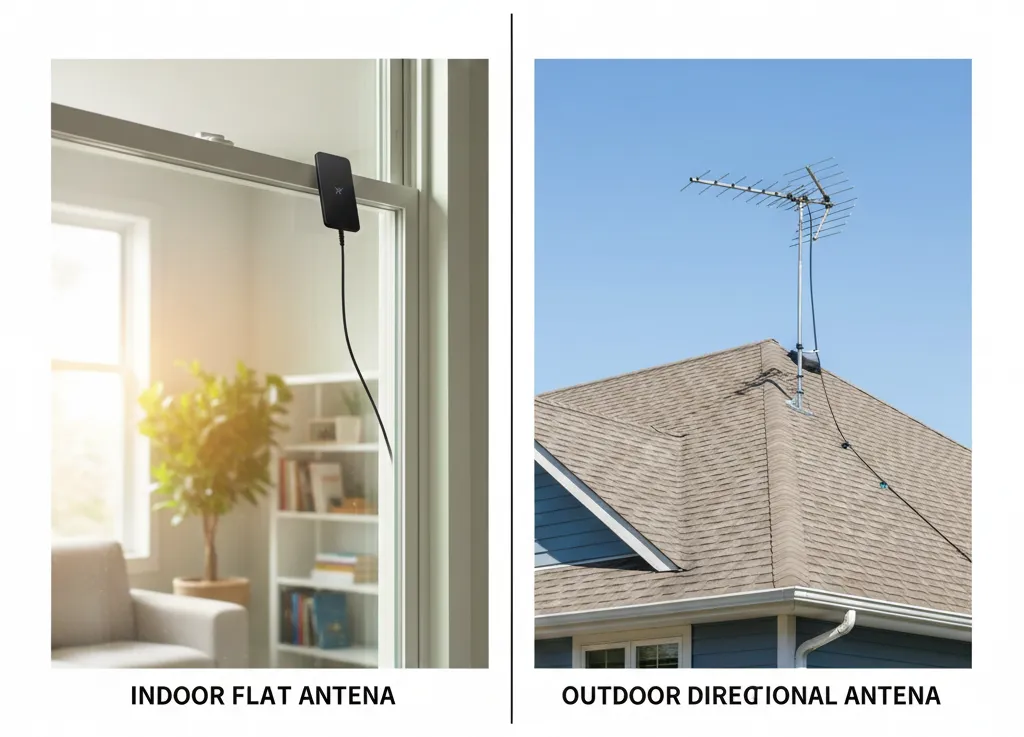
Indoor Antennas
Indoor antennas work inside your home and typically serve one TV location.
Range: 25 to 50 miles from broadcast towers
Cost: $10 to $50
Best use cases:
- Urban locations within 15 miles of towers
- Apartment buildings where outdoor installation is prohibited
- Homes with strong signal strength
Indoor antennas perform best when placed high on a wall or in a window facing broadcast towers. The higher the placement, the better the reception.
Limitations: Building materials reduce signal strength by 30 to 50 percent. Metal roofs, aluminum siding, and radiant barriers in attics block signals. Brick and stucco walls weaken reception.
Indoor antennas struggle in basements and rooms without windows. First-floor placement often fails in areas beyond 25 miles from towers.
Outdoor Antennas
Outdoor antennas mount on roofs, in attics, or on elevated decks.
Range: 50 to 100+ miles from broadcast towers
Cost: $50 to $150
Best use cases:
- Suburban and rural locations
- Areas with hills or buildings blocking line-of-sight
- Homes more than 25 miles from broadcast towers
- Locations needing maximum channel reception
Outdoor antennas must point toward broadcast towers. A directional antenna focuses on towers in one direction and rejects interference from other directions. An omni-directional antenna receives signals from all directions equally.
Installation considerations: Professional installation costs $100 to $300. The installer runs coaxial cable from the antenna to your AirTV device location.
Attic installation offers a compromise between outdoor and indoor antennas. Signals penetrate roofing materials more easily than walls. Attic placement protects the antenna from weather.
Amplified vs. Non-Amplified Antennas
Amplified antennas include an electronic component that boosts weak signals.
Use amplification when:
- Distance from towers exceeds 30 miles
- Terrain blocks line-of-sight to towers
- Multiple TVs share one antenna
- Signal strength tests show weak reception
Avoid amplification when:
- Living within 10 miles of broadcast towers
- Signal strength is already strong
- Towers transmit high-power signals
Over-amplification causes problems. Strong signals become overloaded and produce pixelation or signal loss. Many amplified antennas include an on/off switch to disable amplification when not needed.
Recommended Antennas for AirTV
For indoor use:
RCA SLIVR Amplified Flat Antenna ($35 to $45)
- Range: 50 miles
- 360-degree multi-directional reception
- Can hang on wall or lay flat
- Removable amplifier
- 10-foot coaxial cable included
For outdoor use:
Televes DigiNova BOSS Antenna ($80 to $120)
- Range: 60+ miles
- Multi-directional design
- LTE interference rejection
- Auto-adjusts signal levels
- Weather-resistant construction
Channel Master CM-4228HD ($70 to $90)
- Range: 60 miles
- Eight-bay design for maximum reception
- UHF/VHF compatible
- No amplifier needed for most locations
All recommended antennas support UHF and VHF frequencies. Major networks (ABC, NBC, CBS, FOX) use both frequency bands. An antenna that only receives UHF will miss some channels.
Sling TV Premium Channels (Optional Add-On)
AirTV works without any Sling TV subscription. Free local channels require only the device and antenna.
Sling TV offers two base plans that add cable channels to your AirTV setup. For a complete breakdown of what Sling includes, see our Sling TV channels list with all available networks.
Orange vs. Blue Plans Explained
Sling Orange: $40 per month
- ESPN, ESPN2, ESPN3
- TNT, TBS
- CNN, Food Network, HGTV
- Disney Channel, Freeform
- One stream at a time
Sling Blue: $40 per month
- FOX Sports 1, NFL Network, NBC Sports
- Bravo, USA, FX
- Discovery, TLC
- Three simultaneous streams
Orange + Blue Combo: $55 per month
- All channels from both plans
- Four simultaneous streams
The plans focus on different content. Orange targets sports fans who watch ESPN. Blue serves households with multiple viewers who need simultaneous streaming.
Neither plan is required to watch free local channels through AirTV.
US Entertainment Channels on Sling
Sling TV provides access to 200+ cable channels through various add-on packages beyond the base Orange and Blue plans.
Popular entertainment channels: A&E, AMC, BBC America, BET, Bravo, Cartoon Network, Comedy Central, Discovery, E!, Food Network, FX, HGTV, History, Lifetime, MSNBC, MTV, National Geographic, Nickelodeon, Paramount Network, Syfy, TBS, TLC, TNT, Travel Channel, truTV, USA, VH1
News channels: Bloomberg, CNBC, CNN, Fox News, HLN, MSNBC, NewsNation, Newsy
Kids channels: Cartoon Network, Disney Channel, Disney Jr, Disney XD, Nick Jr, Nickelodeon, TeenNick
Sports Channels on Sling
Included in base plans: ESPN, ESPN2, ESPN3 (Orange only), NFL Network (Blue only), FS1, NBC Sports (Blue only)
Sports Extra add-on ($11/month): NBA TV, NHL Network, MLB Network, Tennis Channel, Golf Channel, beIN Sports, Stadium, SEC Network
International Channels on Sling
Sling offers dedicated packages for 18 languages and regions:
Spanish packages include Univision, Telemundo, ESPN Deportes, and 50+ Latino channels.
Arabic package features 75+ channels including MBC, Al Jazeera, and regional content.
Hindi package provides 25+ channels with Bollywood content and Indian news.
Additional language packages serve Mandarin, Cantonese, Vietnamese, Portuguese, Italian, Polish, and other communities.
Is Sling TV Worth Adding to AirTV?
Add Sling TV if you watch cable channels regularly and want them integrated with local channels in one app.
Skip Sling TV if local channels meet your needs and you use separate services like Netflix or Hulu for on-demand content. Consider alternatives like Sling Freestream for completely free streaming options.
The integration benefit is convenience. Free local channels and paid cable channels appear in one unified guide. You search once and find content from both sources.
Sling TV operates month-to-month with no contracts. You can cancel anytime without penalty.
Supported Devices for AirTV Streaming
AirTV channels stream through the free Sling app to these devices:
Smart TVs:
- Samsung Smart TVs (2017 and newer)
- LG Smart TVs (webOS 3.0 and newer)
- Vizio SmartCast TVs
- Android TV-based sets (Sony, Hisense, TCL)
Streaming devices:
- Roku (all models from 2015 forward) – full Roku channels list available
- Amazon Fire TV and Fire TV Stick (all generations) – check how to get local channels on Amazon Fire Stick for setup
- Apple TV (4th generation and newer)
- Chromecast (2nd generation and newer)
- Android TV streaming boxes
Mobile devices:
- iPhone and iPad (iOS 13 and newer)
- Android phones and tablets (Android 8.0 and newer)
Computers:
- Chrome browser (version 80+)
- Safari (macOS 10.14+)
- Edge (Windows 10+)
- Firefox (version 75+)
Gaming consoles:
- Xbox One, Xbox Series S, Xbox Series X
One AirTV device supports unlimited simultaneous streams within your home network. The limitation is your device’s tuner count. AirTV 2 provides 2 simultaneous streams. AirTV Anywhere provides 4 simultaneous streams.
Remote viewing works when away from home but counts against your tuner limit. If all tuners are in use at home, remote viewers cannot access channels.
How to Set Up AirTV: Step-by-Step Guide
Initial Setup (15 Minutes)
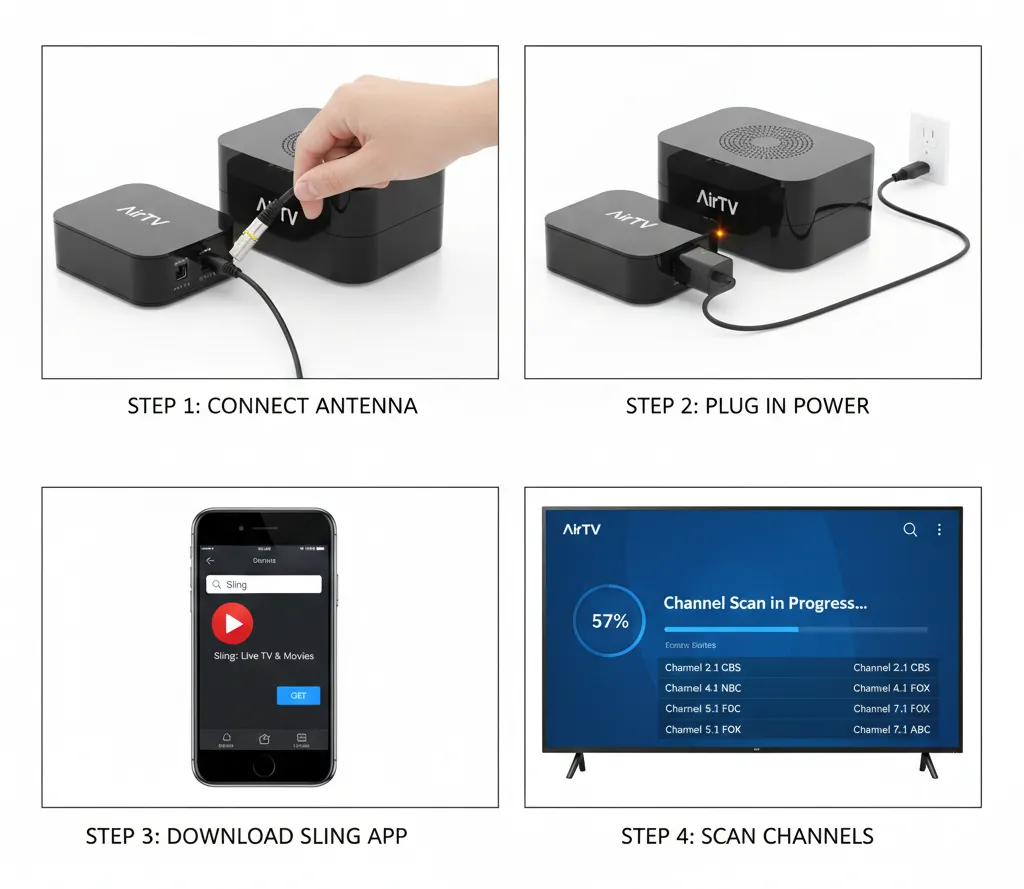
Step 1: Connect your HD antenna to the AirTV device’s coaxial input port. Hand-tighten the connection. Do not over-tighten.
Step 2: Plug the AirTV device into power using the included adapter. The status light turns solid orange during startup.
Step 3: Connect the device to your WiFi network. Press the WPS button on your router, then the WPS button on the AirTV within 2 minutes. The light turns blue when connected.
Alternatively, use Ethernet cable for wired connection. Plug an Ethernet cable from your router to the AirTV device’s Ethernet port.
Step 4: Download the free Sling app on any supported device. The app is available in the Apple App Store, Google Play Store, Roku Channel Store, Amazon Appstore, and Microsoft Store.
Step 5: Open the Sling app and create a free account. No payment information is required to watch local channels.
Step 6: The app automatically detects your AirTV device on the network. Select “Scan for channels” when prompted.
Step 7: Channel scanning takes 3 to 8 minutes. The device searches all broadcast frequencies and identifies receivable channels.
Step 8: Review the channel list. The app displays all detected channels with signal strength indicators.
Setup is complete. Channels now appear in the Sling app’s guide alongside any Sling TV channels if you have a subscription.
Antenna Placement Tips for Best Signal
Height matters most. Every 10 feet of additional height increases reception range by approximately 5 miles. Second-story placement outperforms first-story placement.
Windows provide better reception than walls. Place indoor antennas in windows facing broadcast towers whenever possible.
Avoid metal obstructions. Keep antennas away from metal shelving, filing cabinets, refrigerators, and HVAC ducts. Metal reflects signals and creates dead zones.
Point directional antennas toward towers. Use AntennaWeb.org to find tower locations. Rotate directional antennas until signal strength maximizes in the Sling app.
Test multiple locations. Move the antenna to 3 or 4 different spots and rescan channels at each location. Small position changes create large signal differences.
Separate from electronics. Keep antennas at least 5 feet away from computers, WiFi routers, and other electronic devices that emit interference.
For outdoor antennas: Roof mounting provides best results. Mount as high as safely possible.
Avoid mounting near power lines. FCC regulations require antennas stay away from electrical wiring.
Secure outdoor antennas to withstand wind. Use mounting brackets rated for your antenna’s weight and wind loads common in your area.
Troubleshooting Common Setup Issues
Problem: AirTV device not detected by Sling app
Solution: Verify device and phone/tablet are on the same WiFi network. Restart the AirTV by unplugging power for 30 seconds.
Problem: Channel scan finds zero channels
Solution: Check antenna connection. Ensure coaxial cable is firmly attached. Try a different antenna if available. Verify broadcast towers operate in your area using FCC.gov database.
Problem: Pixelation or freezing on some channels
Solution: Weak signal strength. Reposition antenna higher or closer to windows. Add amplification if more than 30 miles from towers. Remove amplification if less than 10 miles from towers.
Problem: Channels disappear after working initially
Solution: Weather may temporarily affect signals. Wait 30 minutes and rescan. Antenna may have shifted position. Re-secure antenna mounting.
Problem: Cannot watch channels remotely
Solution: Enable remote viewing in AirTV settings within Sling app. Verify your home internet upload speed exceeds 5 Mbps. Check that all tuners are not in use.
AirTV Features and Benefits
DVR Functionality
AirTV 2 and AirTV Anywhere include digital video recording for local channels only. You cannot record cable channels from Sling TV subscriptions.
Recording capacity by device:
AirTV 2 depends on your external hard drive size:
- 500GB drive: 75 hours of HD content
- 1TB drive: 150 hours of HD content
- 2TB drive: 300 hours of HD content
AirTV Anywhere includes 1TB built-in storage:
- 150 hours of HD content
Recording capacity assumes average HD bitrates. Live sports and action content use higher bitrates and consume more storage per hour.
DVR features:
- Schedule recordings by series or single episode
- Pause and rewind live TV up to 90 minutes
- Fast-forward through recordings
- Keep recordings indefinitely until you delete them
- Record two shows simultaneously on AirTV 2
- Record four shows simultaneously on AirTV Anywhere
Storage requirements for external drives:
Any USB 2.0 or USB 3.0 external hard drive works with AirTV 2. Solid-state drives (SSD) and traditional hard disk drives (HDD) both function properly.
AirTV supports drives from 50GB to 2TB capacity. The device requires formatting the drive, which erases all existing content. Use a dedicated drive for AirTV only.
Power requirements vary. Some drives draw power through USB connection. Larger drives may require separate power adapters. If the drive includes a power adapter, use it.
Multi-Room Streaming
One AirTV device serves your entire home. The device connects to WiFi and sends channels to any compatible device on your network.
Simultaneous streaming limits:
AirTV 2: 2 people can watch different channels at the same time
AirTV Anywhere: 4 people can watch different channels at the same time
Additional viewers can watch the same channel as someone else without counting against the limit. The limit applies only when people watch different channels.
In-home vs. on-the-go viewing:
In-home viewing works automatically when connected to your home WiFi network. No configuration required.
On-the-go viewing allows watching local channels from anywhere with internet access. Enable the feature in AirTV settings within the Sling app.
Remote viewing requires stable internet at both locations. Your home upload speed should exceed 5 Mbps. The remote location download speed should exceed 5 Mbps.
Quality auto-adjusts based on available bandwidth. Slower connections receive lower resolution streams to prevent buffering.
HD Picture Quality
Over-the-air broadcasts deliver better picture quality than cable or satellite in most cases.
Cable and satellite companies compress video signals to fit more channels in limited bandwidth. This compression reduces detail and introduces artifacts.
Broadcast signals transmit at full ATSC 1.0 bitrates up to 19.39 Mbps. Cable providers often compress the same content to 8 to 12 Mbps.
The difference is visible on large TVs over 50 inches. Fine details in faces, grass, and textures appear sharper through AirTV than through cable.
AirTV Mini supports 4K resolution for streaming apps like Netflix and YouTube. Local broadcast channels currently transmit in 1080i or 720p. The coming ATSC 3.0 standard will enable 4K broadcasts, but few stations have deployed it as of 2026.
AirTV Cost Analysis: Real Savings Calculator
Cable and satellite providers charge for local channel access even though the channels broadcast free over-the-air.
Typical local channel fees: Comcast Xfinity: $18.50 per month (2026) DIRECTV: $12 per month Dish Network: $12 per month Spectrum: $16.45 per month Cox: $15 per month
Annual cable costs for local channels: $12/month = $144 per year $15/month = $180 per year
$18.50/month = $222 per year
AirTV one-time costs: Device: $49 to $199 Antenna: $25 to $100 Total: $74 to $299
Break-even timeline:
At $12/month cable fees:
- $74 AirTV setup = 6 months to break even
- $199 AirTV setup = 17 months to break even
At $18/month cable fees:
- $74 AirTV setup = 4 months to break even
- $199 AirTV setup = 11 months to break even
Five-year comparison:
Cable local channels at $15/month: $900 total AirTV with $150 total setup: $150 total Savings: $750 over five years
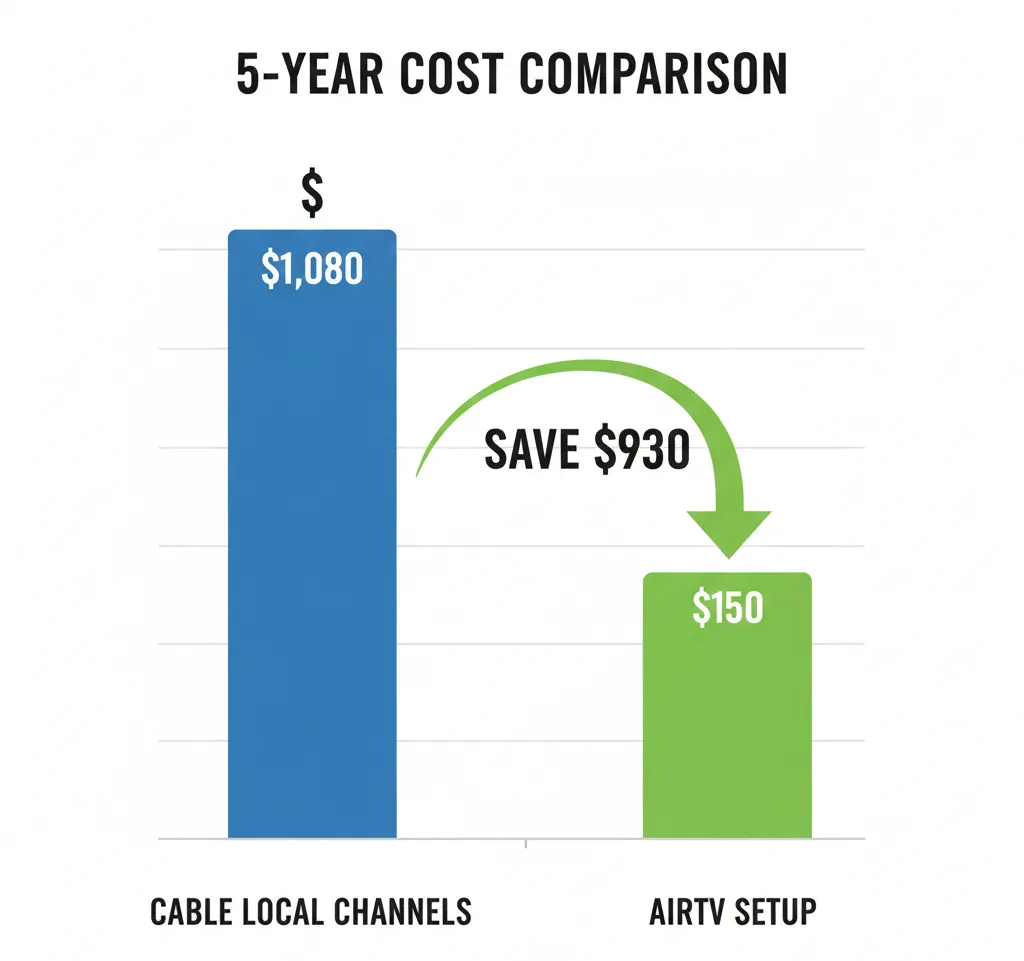
Cable local channels at $18/month: $1,080 total AirTV with $150 total setup: $150 total Savings: $930 over five years
These calculations exclude Sling TV subscriptions. The comparison measures only local channel access costs.
Frequently Asked Questions
Do I need internet for AirTV?
Yes for multi-room streaming. The AirTV device requires WiFi or Ethernet connection to stream channels to other devices in your home.
No for single-TV viewing if you use AirTV Player connected directly to one TV via HDMI. This discontinued older model worked without internet.
Current AirTV 2 and AirTV Anywhere models require internet connection to function.
Can I use AirTV without Sling TV?
Yes completely. AirTV accesses free local channels without any Sling TV subscription. You use the free Sling app to watch channels, but no paid subscription is required.
The Sling app serves as the viewer interface whether you pay for cable channels or only watch free local content.
How many TVs can I connect?
Unlimited TVs can display AirTV channels, but simultaneous viewing is limited by tuner count.
AirTV 2: 2 different channels simultaneously AirTV Anywhere: 4 different channels simultaneously
Ten people can watch the same channel at once without issues. The limitation applies when people want to watch different channels.
Does AirTV work in rural areas?
Sometimes, depending on distance from broadcast towers and terrain.
Rural locations within 40 miles of towers with clear line-of-sight work well with outdoor antennas.
Rural locations beyond 70 miles or blocked by mountains struggle with reception regardless of antenna quality.
Check available channels at your address using the AirTV.net channel finder before purchasing.
Can I record shows?
Yes with AirTV 2 and AirTV Anywhere. You cannot record shows with AirTV Mini.
AirTV 2 requires an external USB hard drive for recording. AirTV Anywhere includes built-in 1TB storage.
You can only record over-the-air local channels. Sling TV cable channels cannot be recorded through AirTV devices.
What happens if I move?
AirTV devices are portable. Disconnect the device, pack it carefully, and reconnect at your new location.
You must rescan for channels at the new address. Different locations receive different local affiliates based on DMA.
Your DVR recordings remain accessible if moving within the same broadcast market. Recordings may show “content unavailable” if you move to a market where those stations do not exist.
No fees or account changes are required when moving.
Do I need to pay monthly fees?
No monthly fees are required for local channel access through AirTV.
You pay once for the device and antenna. Local channels remain free forever.
Optional Sling TV subscriptions add cable channels but are not required for basic functionality.
Can I watch NFL games?
Yes, all NFL games broadcast on CBS, NBC, FOX, and ABC are available through AirTV.
Sunday afternoon games on CBS and FOX Sunday Night Football on NBC
Monday Night Football on ABC/ESPN (ABC simulcast available in some markets) Thursday Night Football on Prime Video (not available through AirTV)
NFL games on ESPN, NFL Network, and Prime Video require separate subscriptions and are not available over-the-air.
Does AirTV include a channel guide?
Yes, the Sling app provides a complete program guide showing current and upcoming shows for all detected channels.
The guide displays 14 days of programming information and updates automatically.
AirTV vs. Competitors
Several companies offer similar over-the-air DVR and streaming solutions.
Channel Master Stream+ ($149)
- Dual-tuner
- 16GB internal storage (very limited)
- Requires external drive for meaningful DVR
- Channel Master app (separate from other streaming services)
Tablo Quad ($200-$250)
- Quad-tuner like AirTV Anywhere
- No internal storage, requires external drive
- Works with more apps than AirTV
- Subscription required for full guide data ($5/month)
HDHomeRun Flex 4K ($199)
- Quad-tuner
- No DVR capability without third-party software
- Requires Plex Pass subscription ($5/month) or other DVR software
- Better for tech-savvy users
Feature comparison:
| Feature | AirTV Anywhere | Channel Master | Tablo Quad | HDHomeRun |
|---|---|---|---|---|
| Price | $99-$199 | $149 | $200-$250 | $199 |
| Tuners | 4 | 2 | 4 | 4 |
| Built-in DVR | 1TB | 16GB | No | No |
| Guide fees | Free | Free | $5/mo | Varies |
| App | Sling | Channel Master | Tablo | Multiple |
AirTV offers the best value for users who want integrated Sling TV access alongside local channels. The device works seamlessly when combining free and paid content.
Tablo provides more flexibility with app support but requires external storage and monthly fees for full features.
HDHomeRun suits technical users comfortable with setting up third-party DVR software like Plex or Channels.
Channel Master costs less upfront but offers limited DVR storage and fewer tuners than AirTV Anywhere.
For cord-cutters exploring other options, consider comparing AirTV with best streaming services for local channels to find the right fit for your needs.
Conclusion
AirTV eliminates monthly fees for local channels by converting over-the-air broadcasts into WiFi streams accessible throughout your home.
You get 50+ channels in most locations including ABC, CBS, NBC, FOX, PBS, and dozens of specialty channels. All content is free and legal.
The three current devices serve different needs. AirTV 2 at $49 works for budget-conscious households. AirTV Anywhere at $99 to $199 handles larger families with heavy DVR use. AirTV Mini adds 4K streaming when paired with other AirTV hardware.
Add a $25 to $100 antenna and you’re watching free TV forever. The average household saves $750 to $950 over five years compared to cable local channel fees.
If you’re exploring other free streaming options beyond local channels, check out Pluto TV, Tubi TV, or Amazon Freevee for on-demand and live streaming content.
For subscription streaming that complements AirTV’s local channels, consider YouTube TV, Hulu TV, FuboTV, or Philo TV for expanded channel lineups.
Check channel availability at your specific address before buying. Signal strength varies significantly based on location and terrain.
Visit AirTV.net to verify channels in your area and choose the device that matches your household size and viewing habits.


