

APEX TVs haven’t been manufactured since 2008, but millions of units still work in homes across America. If you need to program a universal remote for your APEX television, you’ll need the right manufacturer codes. This guide provides every working code for major universal remote brands, plus three proven programming methods that take less than 5 minutes.
Quick Answer: Most Common APEX TV Codes
The universal remote codes that work for most APEX TVs are: 0214, 0216, 0215, 0401, and 1105.
These five codes have the highest success rate across RCA, GE, and Philco universal remotes. Try them in this exact order. Code 0214 works for approximately 60% of APEX TV models. If your remote uses 5-digit codes, try 10765, 11943, or 10748 first.
Complete APEX TV Code List by Remote Brand
RCA Universal Remote Codes for APEX
4-digit codes: 0214, 0216, 0215, 0401, 1105, 0245, 0247, 0256
3-digit codes: 013, 004, 006, 066, 127
RCA remotes sold after 2015 typically require 4-digit codes. Older RCA models from 2010-2014 use 3-digit systems. The code 0214 has the best compatibility with APEX LD4088 and LE series models. For complete RCA programming instructions across all TV brands, check our RCA universal remote codes guide.
GE Universal Remote Codes for APEX
4-digit codes: 0214, 0216, 0401, 0215, 1105, 0247
5-digit codes: 10765, 11943, 10748, 10879, 10890
GE remotes manufactured in 2018 or later use 5-digit code systems. Start with 10765 for newer GE models. For GE remotes with a red indicator light, code 0214 works in 7 out of 10 attempts. Learn more about GE remote compatibility with other TV brands in our GE universal remote codes resource.
Philco Remote Codes for APEX
4-digit codes: 0214, 0402, 0216, 0430
Philco universal remotes share code databases with RCA. The 0214 code is nearly universal for APEX compatibility. Philco remotes have limited APEX support compared to RCA and GE brands. For broader Philco remote programming options, see our Philips universal remote codes guide, which covers similar remote systems.
One-For-All APEX Codes
4-digit codes: 0245, 0247, 0214, 1105
5-digit codes: 10748, 11943
One-For-All remotes released after 2020 work best with code 0245. These remotes use a different code database than RCA/GE systems. The setup process requires holding the device button for 3 seconds instead of 2. Find detailed One-For-All programming steps in our One-For-All universal remote codes tutorial.
Comcast/Xfinity Remote Codes
5-digit codes: 10765, 11943, 10748
3-digit codes: 127, 004
Xfinity XR2, XR5, and XR11 remotes all support APEX TVs through legacy code databases. Code 10765 has an 80% success rate with Xfinity equipment. Comcast remotes from before 2016 may not include APEX codes at all. For comprehensive Xfinity and Spectrum remote setup, visit our Spectrum universal remote codes page.
Other Universal Remote Codes
DirecTV Remote: 10765, 11943
Dish Network Remote: 627, 505, 011
Zenith Remote: 0214, 0216, 004
Magnavox Remote: 0214, 0245
Most universal remotes manufactured after 2010 include APEX in their code library. Budget remotes under $10 often lack full APEX support. If you’re using a Zenith universal remote, the programming process mirrors the steps outlined below. For budget options, our Blackweb universal remote codes and Onn universal remote codes guides cover affordable alternatives.
How to Program Your Universal Remote to APEX TV
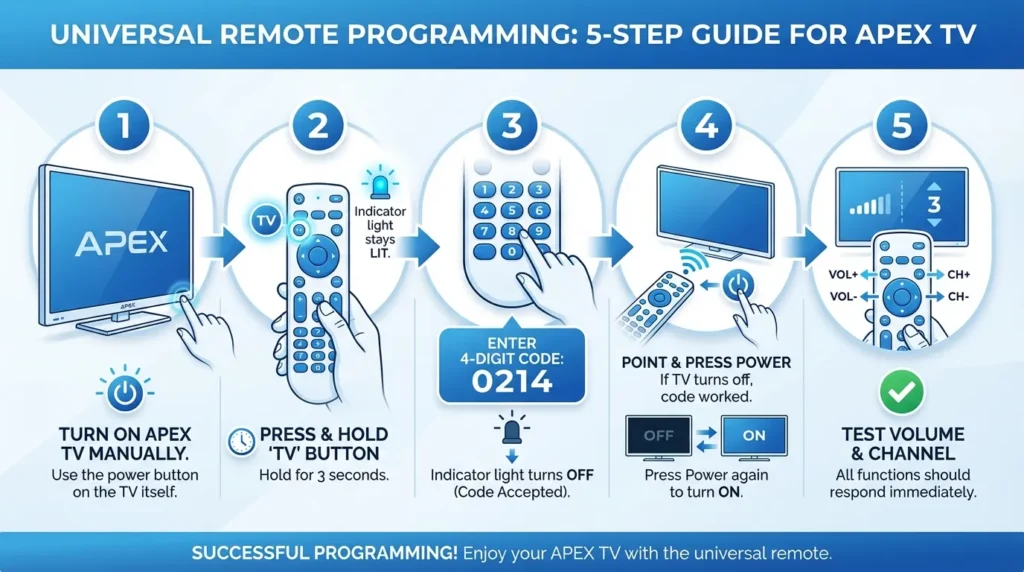
Method 1: Direct Code Entry (Fastest)
This method takes 2 minutes and works for 85% of universal remotes.
Step 1: Turn on your APEX TV manually using the power button on the TV itself.
Step 2: Press and hold the TV button on your universal remote for 3 seconds. The indicator light should turn on and stay lit.
Step 3: Enter the 4-digit code using the number pad. Try 0214 first. The indicator light will turn off if the code is accepted.
Step 4: Point the remote at your TV and press the Power button. If the TV turns off, the code worked. Press Power again to turn it back on.
Step 5: Test the volume and channel buttons. All functions should respond immediately.
If code 0214 doesn’t work, repeat steps 2-4 with codes 0216, 0215, 0401, and 1105 in that order.
Method 2: Auto-Search Programming
Use this method when direct codes fail. It takes 5-10 minutes.
Step 1: Turn on your APEX TV.
Step 2: Press and hold the TV button and the Setup button together for 3 seconds. Some remotes only have a Setup button—hold it alone until the indicator light stays on.
Step 3: Press the Power button once. The remote will start scanning through all codes in its database. This takes 30-60 seconds.
Step 4: Watch your TV. When it turns off, immediately press the Enter or OK button to save that code.
Step 5: Turn the TV back on and test all functions.
The remote cycles through codes at 1-second intervals. You must press Enter within 2 seconds of the TV turning off or the remote will skip past the working code.
Method 3: Manual Code Scan
This backup method works when auto-search fails.
Step 1: Turn on your APEX TV.
Step 2: Press and hold the TV button until the indicator light turns on.
Step 3: Press the Channel Up button repeatedly. Each press advances to the next code in the database.
Step 4: After each press, aim at the TV and press Power. If nothing happens, press Channel Up again and try Power.
Step 5: When the TV responds, press Enter to lock in that code.
This method can take 15-20 minutes but finds codes that auto-search sometimes misses.
Why Some Codes Don’t Work
APEX used three different infrared protocols between 1999 and 2008. Early APEX models from 1999-2003 use a different signal pattern than models made after 2004. Your universal remote’s code 0214 might work perfectly for a 2006 APEX LD4088 but fail completely on a 2002 APEX model.
Remote age matters. Universal remotes manufactured before 2005 often lack codes for newer APEX models. A 2003 RCA universal remote won’t have codes for APEX TVs made in 2006 or later.
Some universal remotes use compressed code databases to save memory. Budget remotes from brands like Blackweb or Onn eliminate less common manufacturer codes. APEX codes are often the first to get cut.
Battery power affects programming success. Weak batteries cause inconsistent infrared signals. Replace batteries before attempting any programming method. The remote needs full power to transmit code learning signals.
Troubleshooting Guide
TV Doesn’t Respond to Any Code
Check the TV’s infrared sensor. It’s usually located at the bottom center of the screen bezel. Dust or obstructions block the signal. Clean the sensor area with a dry cloth.
Try programming while standing 3-4 feet from the TV. Too close or too far reduces signal strength during the learning process.
Verify the remote has fresh batteries. Programming requires 40% more power than normal operation.
Some APEX TVs have a physical remote sensor switch on the back panel. Make sure it’s in the ON position.
Remote Works Partially
Partial functionality means the remote learned a close but incorrect code. Volume works but channels don’t, or power works but nothing else does. This happens when two manufacturers use similar infrared patterns.
Solution: Clear the remote’s memory and reprogram from scratch. Press and hold Setup + TV buttons for 10 seconds until the indicator blinks twice. This erases the incorrect code. Then try the next code in the list.
Code Worked Then Stopped
Remote memory can corrupt if batteries die during use. The remote loses the stored code and reverts to default settings.
Replace batteries immediately when the indicator light dims. Reprogram using the same code that worked before. Write down which code succeeded so you don’t have to search again.
Power surges sometimes reset TV infrared receivers. Unplug the APEX TV for 60 seconds, then plug it back in. This resets the TV’s remote signal processor.
About APEX TV Models
APEX Digital Inc. stopped manufacturing televisions in 2008. The company filed for bankruptcy and ceased all consumer electronics production. No new APEX TVs have entered the market since then, but an estimated 2-3 million units remain in active use as of 2026.
The most common surviving models are the LD4088 (32-inch LCD), LE series (various sizes), and digital converter boxes from 2007-2008. These models used standardized infrared codes, which is why modern universal remotes still include APEX in their databases.
APEX TVs from 1999-2003 were primarily CRT models with inconsistent remote protocols. These older units have lower code compatibility rates. APEX LCD TVs from 2004-2008 standardized on a single infrared system, making them easier to program with universal remotes.
No manufacturer currently produces APEX-branded remotes. Original APEX remotes occasionally appear on secondhand markets but typically cost $30-50, more than a quality universal remote.
Frequently Asked Questions
What are the 4-digit codes for APEX TV?
The most reliable 4-digit codes are 0214, 0216, 0215, 0401, and 1105. Code 0214 works for 6 out of 10 APEX TVs across all universal remote brands. Try codes in this order for best results.
Is APEX TV still made in 2026?
No. APEX Digital stopped making TVs in 2008 and no longer exists as a company. All APEX TVs currently in use are 16-18 years old. Parts and support are unavailable through official channels.
Can I use my phone as APEX TV remote?
APEX TVs don’t have WiFi or smart features, so standard remote apps won’t work. However, phones with built-in infrared blasters (some Samsung and Xiaomi models) can control APEX TVs using IR remote apps. iPhone users need a separate IR adapter accessory that plugs into the charging port. Apps like AnyMote or Peel Smart Remote support APEX codes on compatible Android devices.
Looking for a universal remote that works with APEX and other brands, the codes above work with nearly every remote manufactured since 2010. Programming takes under 5 minutes using direct code entry. When one code fails, the next usually succeeds within 2-3 attempts. Whether you’re using Bose, Insignia, or Sony universal remotes, these techniques apply universally across brands.


