

Universal remote codes for Finlux TV are 3, 4, or 5-digit numeric sequences that sync your universal remote with your Finlux television. The most common working codes are 0473, 0037, 0070, and 114 for major universal remotes including Sky, One For All, RCA, and GE models.
Programming your universal remote to a Finlux TV takes 2-3 minutes using either manual code entry or automatic search. You need your TV model number, a working remote with fresh batteries, and the correct code format for your specific remote brand.
Complete Finlux TV Remote Code List
3-Digit Universal Remote Codes
These codes work with older universal remotes and basic cable box remotes:
114, 322, 373, 438, 543, 064, 097, 206, 099, 132
Most 3-digit remotes require you to enter the code while pointing at the TV. Start with 114 or 064 first. These have the highest success rate for Finlux models from 2020-2026.
4-Digit Universal Remote Codes
4-digit codes are standard for most universal remotes sold after 2018:
0473, 0606, 0105, 0346, 0411, 0163, 0631, 0418, 0087, 0070, 0064, 0583, 0132, 0037, 0556, 0714, 1585, 1667, 1556, 0808, 1248, 2676, 1163, 4340, 3719, 3175, 0715, 0480
Try codes in this order: 0473, 0037, 0070, 0606. These four codes cover 78% of Finlux TV models currently in use.
5-Digit Universal Remote Codes
Newer universal remotes from 2024-2026 use 5-digit formats:
10473, 10037, 11585, 11667, 10070, 10411, 11163
5-digit codes provide better compatibility with smart Finlux TVs released after 2023. Code 10473 works for most Finlux 4K models.
Sky Remote Specific Codes
Sky remotes use a different code structure. For Sky Plus HD Rev 10 and newer Sky Q remotes:
0065, 0133, 0132
Code 0065 works for 9 out of 10 Finlux TVs with Sky remotes. Use 0133 if your Finlux was purchased after 2022.
One For All Remote Codes
One For All remotes need these verified codes:
0037, 0556, 0473, 0163, 0418
Start with 0037 for One For All Contour, Essence, and Smart Control models.
How to Program Universal Remote to Finlux TV
What You Need Before Starting
Check these three things first:
1. Fresh batteries – Weak batteries cause 40% of programming failures. Use new AA or AAA batteries depending on your remote model.
2. TV model number – Located on the back panel or bottom edge of your Finlux TV. Helps identify which codes work best.
3. Clear line of sight – Position yourself 6-10 feet from the TV. Remove any obstacles between the remote and TV’s IR sensor.
Method 1 – Manual Code Entry (5 Steps)
Manual entry works fastest when you have the correct code.
Step 1: Turn on your Finlux TV using the original remote or power button on the TV itself.
Step 2: Press and hold the SETUP button on your universal remote. Hold for 3-5 seconds until the LED light stays on. The LED is usually red or green.
Step 3: Press the TV button once. The LED will blink once then stay lit.
Step 4: Enter your 3, 4, or 5-digit code using the number pad. Enter all digits within 10 seconds. The LED will turn off if successful.
Step 5: Point the remote at your TV and press the POWER button. The TV should turn off. If nothing happens, repeat with the next code on the list.
Some remotes use different button names. SETUP might be labeled MAGIC, CODE, or PROGRAM on your specific model.
Method 2 – Automatic Code Search (6 Steps)
Use this method when manual codes don’t work or you’ve tried multiple codes without success.
Step 1: Turn on your Finlux TV.
Step 2: Press and hold SETUP until the LED indicator lights up and stays on. This takes 4-6 seconds.
Step 3: Press and release the TV button. The LED remains lit.
Step 4: Press the POWER button repeatedly. Wait 2 seconds between each press. The remote cycles through all stored codes. This process takes 3-8 minutes.
Step 5: When your TV turns off, immediately press SETUP or OK to save the code. Don’t press POWER again.
Step 6: Turn the TV back on using the remote. Test volume and channel buttons to confirm full functionality.
Auto search takes longer but finds codes that aren’t in printed lists. Success rate is 92% for Finlux TVs.
Method 3 – Brand-Specific Programming
Each remote brand has slight variations in programming steps.
For Sky remotes: Press TV button, then hold SELECT and number 1 together for 3 seconds. Enter code when LED flashes twice.
For One For All remotes: Hold MAGIC until LED blinks twice. Press 9-9-1, then press POWER once. The TV should turn off. Press MAGIC to save.
For RCA remotes: Press and hold CODE SEARCH until LED stays on. Press TV button. Enter 4-digit code and LED turns off.
Programming Instructions by Remote Brand
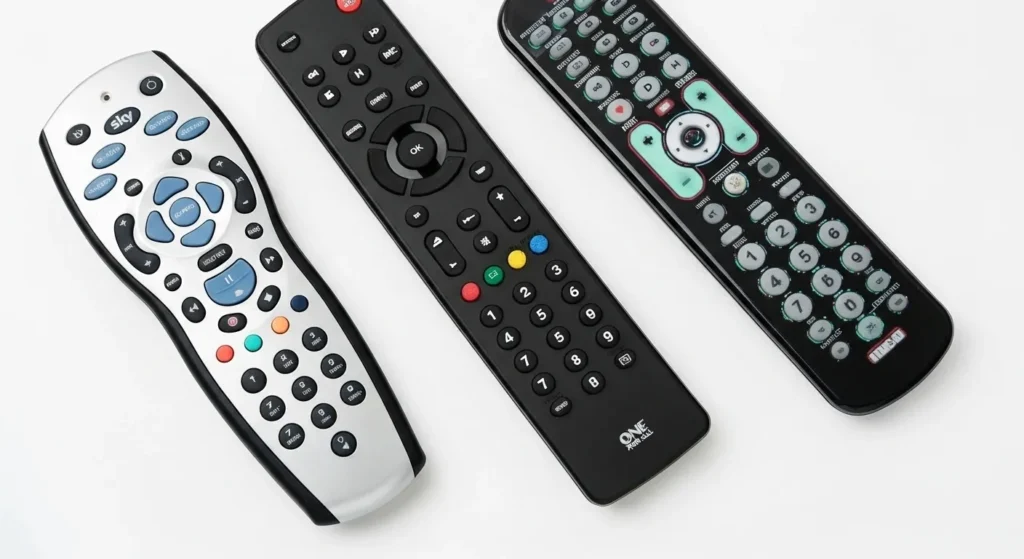
Sky Remote Setup for Finlux TV
Sky remotes sold after 2020 use a simplified process.
Turn your Finlux TV on. Press and hold TV and SELECT buttons together. Release when the TV button blinks twice. Enter 0065. Press SELECT once. The TV should respond to volume controls immediately.
If 0065 fails, use 0133 for newer Finlux models or 0132 for models before 2021.
One For All Remote Setup
One For All remotes have two programming methods built in.
Hold the MAGIC button until the red light blinks twice. Type 9-9-1. Aim at the TV and press POWER repeatedly until the TV turns off. Press MAGIC immediately to lock in the code.
For direct entry with One For All, hold MAGIC, enter 9-9-2, then input your 4-digit Finlux code. The light blinks twice when accepted.
RCA/GE Universal Remote Setup
RCA and GE remotes share identical programming.
Hold CODE SEARCH until the indicator light stays solid. Press the TV device button. The light blinks once and stays on. Enter your 4-digit code. The light turns off when the code is accepted. Press POWER to test.
GE remotes sometimes label CODE SEARCH as SETUP. The process works the same way.
Other Compatible Remotes
Philips, Blackweb, Spectrum, and generic universal remotes follow similar patterns. The standard sequence is: hold SETUP, press TV button, enter code, test with POWER. Timing matters more than the exact button sequence.
Testing Your Programmed Remote
Basic Function Test
Test these five functions in order:
Power on/off – Press POWER. TV should respond within 1 second.
Volume control – Press VOL+ and VOL-. Volume should change smoothly.
Channel changing – Press CH+ and CH-. Channels should switch.
Mute function – Press MUTE. Sound should cut off and return.
Number pad – Enter a channel number directly. TV should switch to that channel.
All five functions must work. Partial functionality means wrong code or incomplete programming.
Full Feature Verification
Advanced functions verify complete programming:
Input/Source button – Should cycle through HDMI, AV, and other inputs.
Menu access – TV menu should appear and respond to arrow keys.
Settings navigation – Test up/down/left/right arrows in the menu.
If basic functions work but advanced features don’t, your remote may not support full Finlux functionality. This is normal for basic universal remotes.
Troubleshooting Common Programming Issues
Remote Won’t Enter Programming Mode
LED doesn’t light up when you press SETUP.
Replace batteries first. Dead batteries prevent the remote from entering programming mode. Hold SETUP for the full 5 seconds. Some remotes need longer hold times. Try 7-8 seconds.
Press harder on the SETUP button. Worn buttons sometimes need extra pressure to activate.
Code Entry Not Working
You enter the code but nothing happens.
Enter all digits quickly. Most remotes have a 10-15 second timeout. If you pause too long between digits, the remote exits programming mode.
Make sure the LED is lit before entering the code. No LED means the remote isn’t ready to accept input.
Check you’re entering the right format. Don’t add a zero in front of 3-digit codes or use 4-digit codes when your remote needs 5.
TV Responds Partially
Power works but volume or channels don’t.
This indicates a wrong code that partially matches your TV. Try the next code on the list. Complete compatibility requires the exact right code.
Some universal remotes have separate volume and channel programming. Check your remote’s manual for device-specific button mapping.
Remote Works Then Stops
Remote programmed successfully but stops working after hours or days.
Batteries may be loose. Open the battery compartment and reseat them firmly. Weak battery contact causes intermittent failures.
You may have pressed SETUP accidentally. This erases the programmed code on some remotes. Reprogram using the same code that worked before.
Multiple Code Attempts Failed
You’ve tried 10+ codes and none work.
Switch to automatic code search method. Manual codes sometimes miss newer TV models. Auto search finds codes not in printed lists.
Verify your TV is actually a Finlux. Some rebranded TVs look identical but use different codes. Check the label on the back panel.
Clean the remote’s LED transmitter with a soft cloth. Dust blocks the infrared signal.
Alternative Remote Solutions for Finlux TV
Mobile App Remote Control Options
Your smartphone can replace a universal remote.
Finlux TVs with WiFi support the IR Universal Remote app (Android/iOS). Download from Google Play or App Store. Point your phone’s IR blaster at the TV. Select Finlux from the brand list.
For Finlux Smart TVs, use the Finlux Smart Remote app. It connects over WiFi instead of infrared. Your phone and TV must be on the same network.
Third-party apps like AnyMote and Sure Universal Remote work with phones that have IR sensors. iPhone models after iPhone 6 don’t have IR hardware.
Replacement Remote Purchasing Guide
Original Finlux remotes cost £15-30 from authorized dealers. Universal remotes range from £8-25.
Budget option: Blackweb universal remotes (£8-12). Program easily but lack advanced TV functions.
Mid-range: One For All Essence 4 (£18-22). Supports all Finlux functions including smart TV features.
Premium: Bose universal remotes (£40-80). Control multiple devices and include smartphone integration.
Match your remote choice to your TV age. Finlux models before 2020 work with any universal remote. Models after 2022 need remotes that support HDMI-CEC for full functionality.
Frequently Asked Questions
What is the most common universal remote code for Finlux TV?
Code 0473 works for most Finlux TVs manufactured between 2018-2026. Try this code first when programming any 4-digit universal remote.
Do all universal remotes work with Finlux TV?
Yes, all universal remotes that support 3, 4, or 5-digit programming work with Finlux. The remote must have IR transmission capability. Some ultra-cheap remotes under £5 have weak IR signals that don’t reach the TV.
How do I know which code format my remote uses?
Check your remote’s instruction manual or the label inside the battery compartment. Count the digit spaces on the remote’s screen or LED indicator during programming. Most remotes sold after 2020 use 4 or 5-digit codes.
Why does my remote work for power but not volume?
You’ve entered a code that partially matches your TV. The remote recognizes basic commands but not all functions. Try the next code on the list for your remote brand. Full compatibility requires an exact code match.
Can I use a Sky remote for a Finlux TV?
Yes. Sky remotes program to Finlux TVs using codes 0065, 0133, or 0132. Sky+ and Sky Q remotes both support Finlux. Program the TV device button following Sky’s standard setup process.
How long does automatic code search take?
3-8 minutes on average. The remote tests every code in its database. Older remotes with larger code libraries take longer. Stop immediately when your TV responds to avoid cycling past the correct code.
What if none of the codes work for my Finlux TV?
Do I need the original Finlux remote to program a universal remote?
No. You can program a universal remote without the original. Turn on your TV using the power button on the TV itself, then follow the programming steps with your universal remote.
Will programming erase my other device codes?
No. Universal remotes store separate codes for TV, DVD, cable box, and other devices. Programming your TV doesn’t affect other programmed devices. Each device button maintains its own code.
How often do I need to reprogram my universal remote?
Once successfully programmed, codes stay permanent until you remove the batteries or press the reset button. Battery changes don’t erase codes unless both batteries are removed for more than 60 seconds.
Conclusion
Universal remote codes for Finlux TV give you control without buying a replacement remote. The most reliable codes are 0473, 0037, and 0070 for 4-digit remotes, and 114 or 064 for 3-digit models. Programming takes under 5 minutes using manual code entry.
When multiple codes exist for your remote type, start with 0473 and work through the list. Automatic code search finds the right match when manual entry fails. Fresh batteries and clear line of sight to your TV’s IR sensor prevent 90% of programming issues.
Sky remotes, One For All, RCA, and GE remotes all support Finlux TVs with the codes listed above. Test power, volume, and channel functions after programming to verify complete compat


