



Setting up a GE universal remote simplifies control over multiple devices. This guide covers ways to program it and lists codes for common brands. First, check your remote model to pick the right codes.
Find Your Remote Version
Look inside the battery compartment. Remove the batteries to see a label. It shows the version, such as CL3, CL4, CL5, or CL6. This helps match codes to your remote.

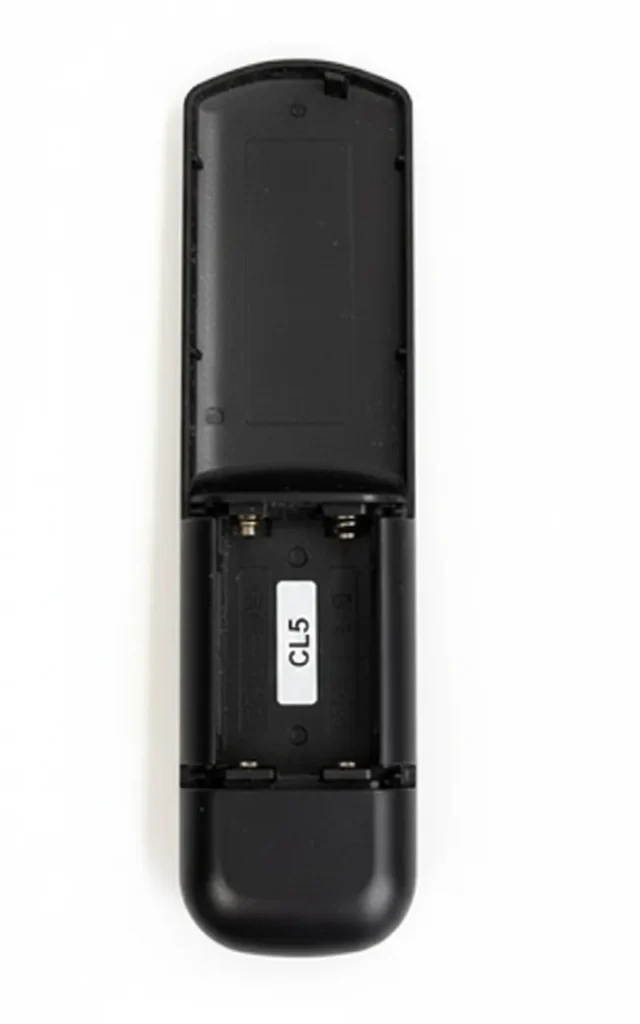
Ways to Program the Remote
You can set up the remote with a code or let it search on its own. Follow these steps for each method.
Direct Code Entry
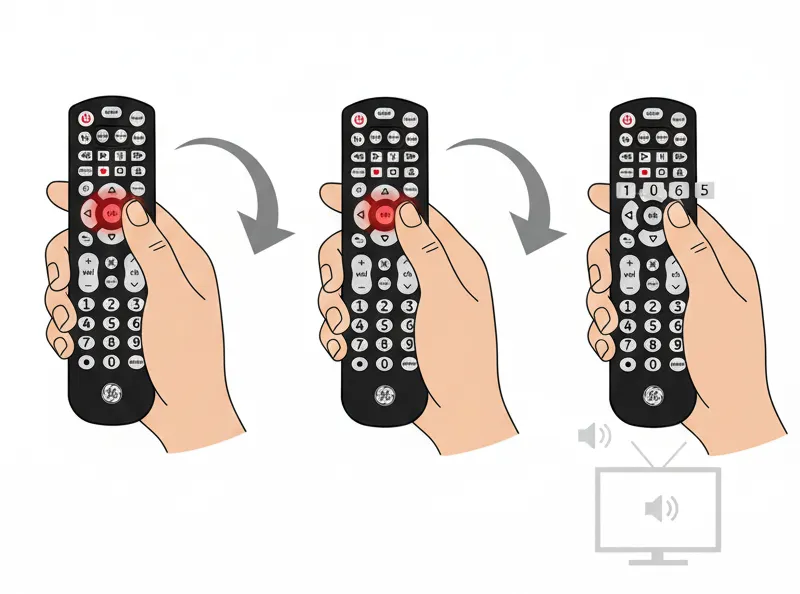
Turn on the device you want to control. Hold the setup button until the red light stays on. Press the button for the device type, like TV. Enter the four-digit code. The light should turn off if it works. Point the remote at the device and test buttons like power or volume.
If the code fails, try the next one for that brand.
Auto Code Search
Power on the device. Hold the setup button until the red light appears. Press the device button. For TVs, press power every few seconds until the device shuts off. Then, press the device button to save. Test the remote.
This method scans codes automatically but may take longer.

GE Universal Remote Codes
Codes vary by remote version and device. Use the list below, grouped by type. Start with codes for your remote’s CL version if listed.
TV Codes
- LG: 0001, 1181, 1221, 1911, 3001, 5511, 6021 (CL3, CL4, CL5, CL6)
- Hisense: 0001, 0671, 2081, 2211, 4391, 5331, 5341, 6161, 6171 (CL3: 2081, 5331, 2211, 4671, 0671, 3671, 4381, 4391; CL4: 6161, 1651, 6171, 2081, 5331, 2211, 2141, 5341, 0001, 0671, 4391; CL5/CL6: 6161, 1651, 6251, 6171, 2081, 5331, 2211, 2141, 5341, 0001, 0671, 4391)
- Sony: 1071, 1901, 2741, 4981, 5321, 5811
- Insignia: 0141, 0371, 0581, 0871, 0921, 2241, 2271, 2891, 2921, 3761, 4371, 4721, 4761, 5051, 5061, 5181, 6171, 6181 (CL3: 2891, 0371, 2271, 0581, 0701, 0871, 0921, 1241, 1381, 2241, 2921, 3761, 3841, 4371, 4721, 4761, 5051, 5061, 5181; CL4: 0921, 2891, 6171, 0371, 2271, 0141, 0581, 0871, 2241, 6181, 2921, 3761, 4371, 4721, 4761, 5051, 5061, 5181)
- Sharp: 0001, 3191, 5341, 5941, 6001, 6011, 6171
- Toshiba: 0211, 0341, 0821, 1121, 1311, 1571, 1801, 1841, 1911, 2691, 4891, 4941, 5081, 5531
- Samsung: 3301, 5791, 5801
- Panasonic: 1571, 5201, 5531, 5561, 5821, 6231
- Philips: 0181, 0201, 0911, 3981, 4261, 5741, 6051, 6221
- TCL: 5771, 5961, 6031, 6171, 6201
- ONN: 5961, 6171, 6431, 6551
- Vizio: 0112, 0126, 0134, 0143, 1011, 5026, 5027, 5040, 5043, 5046, 5050, 5074, 5075, 5078, 5080, 5081, 5084, 5085, 5086, 5087, 5090, 5100, 5109, 5115, 5139, 5140 (Note: From additional sources, but match to CL if possible)
- Roku TV (Hisense): Use Hisense codes above
- Element: 1091, 1651, 2401, 5341, 5361, 5421, 5471, 5831, 5841, 6021
- Emerson: 0001, 0141, 0201, 0231, 0951, 1551, 1651, 4731, 5221, 5231, 5421, 5551, 5561, 5741, 5761, 5831
- Dynex: 0371, 2891, 3141, 3161, 5311
- Haier: 0671, 0861, 0921, 2141, 3831, 4851, 6141, 6151
- Hitachi: 0925, 4331
- JVC: 0418, 0900, 0923, 0964, 1072
- Magnavox: 0398, 0408, 0423, 0456, 0458, 0755, 0969, 0979, 0980, 0981
- Sanyo: 0416, 0904
- Westinghouse: 0458, 1712, 5048, 5054, 5101, 5116, 5117, 5143, 5179
DVD Player Codes
- Bose: 0672, 6170
- Philips: 0398, 0408, 0423, 0456, 0458, 0755, 0969, 0979, 0980, 0981, 6002, 6008, 6019, 6022, 6046, 6084, 6085, 6123, 6134, 6139, 6167, 6168, 6228, 6238, 6239, 6240, 6285, 6306, 6489, 6545, 6549
- Panasonic: 0387, 0396, 0400, 0421, 0437, 0950, 0970, 0974, 6001, 6002, 6011, 6026, 6090, 6096, 6097, 6103, 6113, 6121, 6216, 6229, 6233, 6471, 6490, 6520, 6544, 6557
- Sony: 0389, 0399, 0986, 0987, 0988, 0989, 6006, 6049, 6095, 6099, 6115, 6124, 6243, 6244, 6245, 6246, 6473, 6487, 6537, 6538, 6543
- Samsung: 0407, 0454, 0455, 0891, 0942, 0963, 6001, 6012, 6032, 6055, 6066, 6129, 6165, 6166, 6210, 6287, 6478, 6479, 6488, 6498
- HP: 6486
- Mitsubishi: 0402, 6003, 6098, 6126, 6485
- Toshiba: 0394, 0398, 0924, 0973, 0983, 6002, 6008, 6012, 6025, 6061, 6076, 6123, 6232, 6295, 6301, 6373, 6475, 6515, 6516, 6525, 6542
- Aiwa: 0414
- Akai: 0395, 0435
- Apex: 0386, 0390, 0391, 0392, 0401, 0424, 0430, 0436, 0439, 0445, 0457, 0459, 0913, 0938, 0949
- Blaupunkt: 0430
- Coby: 0445, 0894, 0916, 0926, 0928, 0946, 0947
- Cyberhome: 0393, 0939, 0985
- Daewoo: 0440, 0441, 0444, 0965, 0971
- Denon: 0400, 0421
- Durabrand: 0405, 0446, 0449
- Emerson: 0405, 0458, 0899, 0940
- Funai: 0456, 0458
- GE: 0409, 0430
- Go-Video: 0407, 0426, 0431, 0454, 0455, 0901, 0902, 0937, 0971
- GPX: 0936, 0944
- Hitachi: 0404, 0407, 0419, 0428
- Insignia: 0405, 0430, 0456, 0905, 0921
- JVC: 0406, 0418, 0900, 0923, 0964, 1072
- Kenwood: 0400, 0429
- KLH: 0386, 0430, 0906
- LG: 0405, 0907, 0972
- Magnavox: 0398, 0408, 0423, 0456, 0458, 0914, 0915, 0969, 0979, 0980, 0981
- Onkyo: 0422, 0975
- Oritron: 0415, 1060
- Pioneer: 0403, 0404, 0909, 0968, 0976, 0977, 1084
- RCA: 0409, 0430, 0449, 0453, 0890, 0920
- Sharp: 0397, 0897, 0908
- Sylvania: 0456, 0458
- Yamaha: 0400, 0408, 0420, 0979, 0980
- Zenith: 0405, 0907
Blu-ray Player Codes
Use DVD codes for Blu-ray players, as they often overlap. For example:
- Insignia: 0405, 0456, 0905, 0921
- LG: 0405, 0907, 0972
- Magnavox: 0398, 0408, 0423, 0456, 0458, 0969, 0979, 0980, 0981
- Panasonic: 0396, 0400, 0437, 0950, 0970, 0974
- Philips: 0398, 0408, 0423, 0456, 0458, 0755, 0969, 0979, 0980, 0981
- Pioneer: 0403, 0404, 0909, 0968, 0976, 0977
- Samsung: 0407, 0454, 0455, 0891, 0942, 0963
- Sharp: 0397, 0897, 0908
- Sony: 0399, 0986, 0987, 0988, 0989
- Toshiba: 0394, 0398, 0924, 0973, 0983
Soundbar Codes
- Bose: 0672
- Insignia: 0405, 0456, 0905, 0921
- LG: 0405, 0907, 0972
- Philips: 0398, 0408, 0423, 0456, 0458, 0755, 0969, 0979, 0980, 0981
- Polk Audio: 0398, 0408, 0981
- Samsung: 0407, 0454, 0455, 0891, 0942, 0963
- Sharp: 0397, 0897, 0908
- Sony: 0399, 0986, 0987, 0988, 0989
- Vizio: 0883, 31517 (Note: Some sources list Vizio soundbar codes separately, but test with TV codes if needed)
- Yamaha: 0400, 0408, 0420, 0979, 0980
Streaming Device Codes
For devices like Roku or Fire TV built into TVs, use the TV brand codes. Standalone streamers may need specific setup:
- Roku: Often uses Hisense or TCL codes if on those TVs
- Amazon Fire TV (Toshiba): Use Toshiba codes like 0211, 0341, 1121, 1311, 1571, 2691, 5531
- Apple TV: 02615, 02000 (Test with audio receiver codes if applicable)
Cable Box and Satellite Codes
- AT&T: 8088, 8206
- Century: 8003, 8016, 8056, 8113
- Dish Network: 5491, 8041, 8045, 8148, 8149, 8191, 8193, 8204
- DirecTV: 8018, 8021, 8023, 8024, 8028, 8034, 8035, 8039, 8040, 8042, 8043, 8044, 8046, 8063, 8109, 8110, 8111, 8139, 8153, 8172, 8178, 8179, 8181, 8184, 8185, 8196, 8199, 8201, 8202, 8203
- Comcast: 8088
- Charter: 8027
- Cogeco: 8088
- Sky Network: 8029, 8109, 8110, 8111, 8170, 8171
- ABC: 8002, 8003, 8014, 8048, 8049, 8050, 8051, 8052
- RCA: 8018, 8195, 8213, 8214
Audio Receiver Codes
- Bose: 0672
- Denon: 0400, 0421
- Harman Kardon: 0427
- JBL: 0427
- Onkyo: 0422, 0975
- Pioneer: 0403, 0404, 0976, 0977
- Polk Audio: 0398, 0408, 0981
- Sony: 0399, 0986, 0987, 0988, 0989
- Yamaha: 0400, 0408, 0420, 0979, 0980
Also Read: Sony Universal Remote Codes 2026: Full Setup Guide
Tips and Fixes
If the remote does not respond, replace the batteries first. Make sure the device is on and in range. Test multiple codes for the brand. For built-in smart TVs, activate the right input before testing. If auto search takes too long, stop and try direct entry. Always point the remote straight at the device during setup.
This covers the main points for using a GE universal remote. If your device is not listed, check the manual or search by brand online.
Explore more:



