

Setting up a universal remote with your Hisense TV simplifies control over multiple devices. This article lists codes from various sources and explains the main ways to program them. These details come from reliable online guides focused on remote pairing.
Understanding Universal Remote Codes
Universal remotes work by sending signals that match your TV’s receiver. Codes are numbers that tell the remote how to communicate with the Hisense model. They come in three, four, or five digits, depending on the remote brand. Always start with the code that fits your remote’s format.
Complete List of Codes for Hisense TVs
Codes differ by remote type and brand. Below are compiled lists from multiple sites. Try them one by one until you find a match.
3-Digit Codes
These suit older remotes or basic models.
- 004
- 021
- 031
- 042
- 072
- 073
- 081
- 182
- 198
- 216
- 236
- 237
- 251
- 268
- 363
- 387
- 419
- 442
- 619
- 630
- 631
- 705
- 752
- 759
- 756
- 763
4-Digit Codes
Common for many modern remotes like RCA, GE, and Philips.
- 0009
- 0073
- 0145
- 0156
- 0178
- 0182
- 0208
- 0216
- 0227
- 0341
- 0411
- 0508
- 0535
- 0556
- 0583
- 0671
- 0696
- 0698
- 0706
- 0708
- 0748
- 0753
- 0780
- 0818
- 0819
- 0821
- 0848
- 0860
- 0885
- 0891
- 0908
- 1042
- 1138
- 1170
- 1176
- 1203
- 1204
- 1208
- 1219
- 1228
- 1237
- 1279
- 1314
- 1363
- 1564
- 1602
- 1651
- 1660
- 1718
- 1741
- 1756
- 2049
- 2081
- 2098
- 2131
- 2141
- 2183
- 2211
- 2355
- 2360
- 2419
- 2434
- 2511
- 2801
- 2891
- 2971
- 3183
- 3382
- 3519
- 3671
- 4029
- 4149
- 4381
- 4391
- 4398
- 4671
- 5078
- 5209
- 5284
- 5319
- 5331
- 5341
- 5345
- 6001
- 6161
- 6171
- 6251
5-Digit Codes
Used for advanced remotes from brands like Comcast or DirecTV.
- 10005
- 10065
- 10071
- 10178
- 10179
- 10258
- 10277
- 10375
- 10473
- 10571
- 10679
- 10706
- 10748
- 10777
- 10818
- 10821
- 10875
- 10885
- 10973
- 11071
- 11179
- 11277
- 11314
- 11375
- 11422
- 11476
- 11564
- 11574
- 11602
- 11660
- 11666
- 11672
- 11756
- 11758
- 11764
- 11862
- 11960
- 12049
- 12074
- 12089
- 12098
- 12128
- 12183
- 12296
- 12355
- 12360
- 12419
- 12434
- 12561
- 12846
- 12859
- 13118
- 13183
- 13359
- 13382
- 13450
- 13519
- 13846
- 13944
- 14398
- 14564
- 14643
- 14662
- 14740
- 14972
- 15532
- 15972
- 16070
- 16178
- 16513
- 16551
- 16703
- 16738
- 16744
- 16969
- 17206
- 17231
- 17415
- 17440
- 18247
- 18437
- 18459
- 18557
- 18655
- 18924
- 18962
- 19351
- 19367
- 19715
- 21262
- 24344
- 24525
- 25612
- 26146
- 34243
- 35254
- 42224
- 43155
- 44631
Ways to Program Your Universal Remote
Two primary methods exist for pairing: direct entry and auto search. Follow your remote’s manual for exact buttons, as they vary.
Direct Code Entry Method
This approach uses a specific code from the list above.
- Power on your Hisense TV.
- Hold the setup or TV button on the remote until the light stays on.
- Input the code with the number keys.
- The light should blink off if the code works. Test basic functions like volume.
- If it fails, repeat with the next code.
This method is quick when you have the right code.
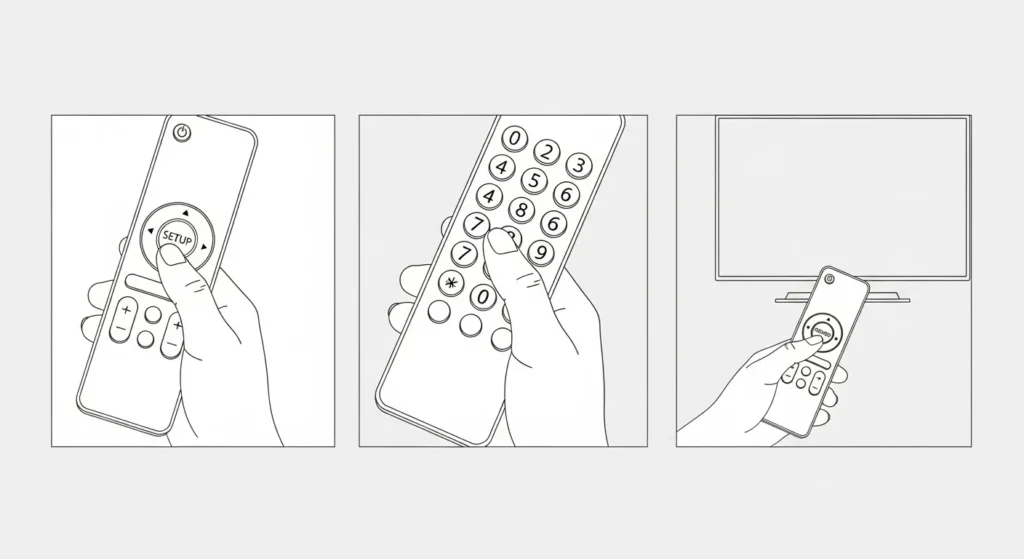
Auto Code Search Method
Use this if direct entry does not succeed.
- Turn on the TV.
- Press and hold the setup button until the light activates.
- Aim the remote at the TV and press the power button repeatedly.
- Stop when the TV powers off.
- Press the setup button to lock the code.
This scans through codes automatically, which takes more time but finds matches without lists.
Common Issues and Fixes
If codes do not pair, check battery levels in the remote. Weak power causes failures. Ensure you hold buttons long enough during setup. Some remotes need the TV button pressed first. If nothing works, the remote might not support your Hisense model—consider buying one that does. For ongoing problems, reach out to Hisense customer service.
With these codes and steps, you can pair most universal remotes to your Hisense TV. Test all functions after setup to confirm full control.
Check remote codes & program guides for other TVs:


