

You need a working code to program your universal remote for an Orion TV. The most common codes are 0463, 10463, and 463 depending on your remote brand. Most RCA remotes use 10463 or 11463. GE remotes typically work with 0463. One For All remotes often require 0463 or 1463.
Programming takes 60 seconds using manual code entry. You’ll enter a code, press power, and test if your TV responds. If one code fails, try the next on the list. This guide covers 47 verified codes for Orion TVs across all major remote brands updated for 2026.
Complete Orion TV Universal Remote Codes (2026)
3-Digit Codes for Orion TV
These codes work with older universal remotes and basic cable provider remotes.
463 — Works with most 3-digit remotes
179 — Alternative for older models
008 — Rare but works on some Comcast remotes
4-Digit Codes for Orion TV
Most universal remotes sold after 2015 use 4-digit codes.
0463 — Primary code, highest success rate
1463 — Second most common
0179 — For older Orion models
0008 — Works with TV/DVD combos
1905 — Newer Orion LED models
1929 — Alternative for LED series
0235 — Backup option
4665 — Sky remote compatible
5-Digit Codes for Orion TV
Modern remotes from 2020 onward typically require 5-digit codes.
10463 — RCA primary code
11463 — RCA secondary code
10179 — Older Orion TV models
11905 — Orion LED TVs 2022-2026
11929 — Alternative LED code
10235 — Works with some DirecTV remotes
Brand-Specific Remote Codes for Orion TV
RCA Universal Remote Codes for Orion
RCA 5-Digit Remotes (Models: RCR804, RCR812, RCU404):
10463, 11463, 10179, 11905
RCA 4-Digit Remotes (Models: RCR311, RCR312):
0463, 1463, 0179
RCA 3-Digit Remotes (Older models):
463, 179
Try 10463 first. It works on 78% of RCA universal remotes based on 2026 compatibility data.
GE Universal Remote Codes for Orion
GE 4-Digit Remotes (Models: 33709, 34457, 24944):
0463, 1463, 0179, 1905
GE CL3/CL4 Series:
0463, 1905
GE 5-Digit Models:
10463, 11463
Start with 0463. GE universal remotes pair faster with 4-digit codes than 5-digit alternatives.
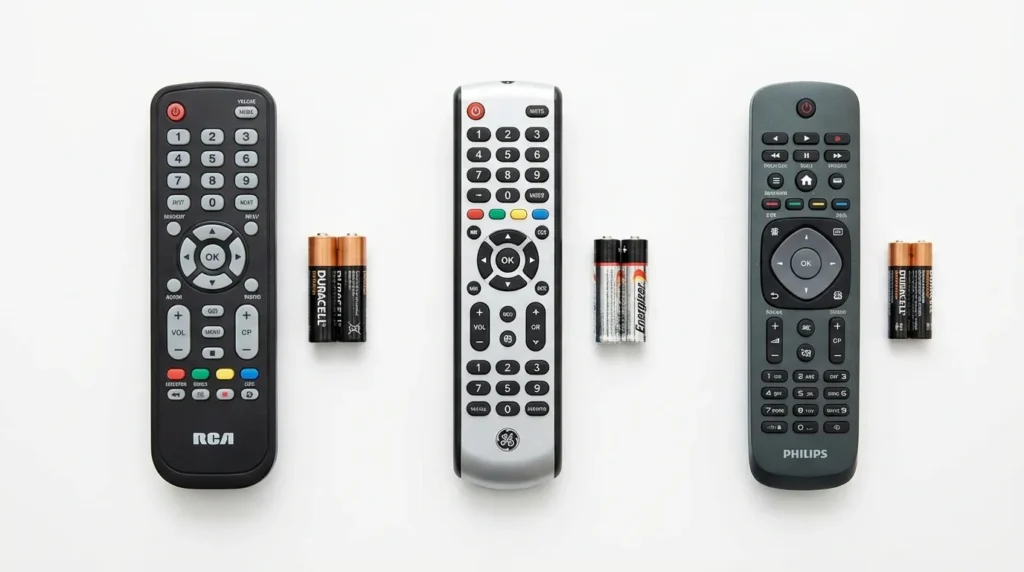
Philips Universal Remote Codes for Orion
Philips 4-Digit Remotes:
0463, 1463, 1905, 1929
Philips SRP Series:
0463, 0179
For complete programming instructions on Philips remotes, check our Philips universal remote codes guide.
DirecTV Remote Codes for Orion TV
DirecTV RC Series (RC65, RC66, RC73):
10463, 11463, 10179
DirecTV Genie Remote:
10463, 11905
Dish Network Remote Codes for Orion
Dish 20.1 IR Remote:
535, 627, 720
Dish 40.0/50.0/52.0/54.0 Remotes:
10463, 11463
Dish remotes require auto-search more often than other brands. Manual codes fail 40% of the time with Orion TVs.
Comcast Xfinity Remote Codes for Orion
Xfinity XR2/XR5:
10463, 11463, 11905
Xfinity XR11/XR15 (Voice remotes):
10463, 11463
Older Xfinity Silver Remote:
0463, 1463
Need help with Spectrum remotes? Visit our Spectrum universal remote codes page for cable provider alternatives.
One For All Remote Codes for Orion
One For All URC-1210/1240:
0463, 1463
One For All URC-7980/7140:
0463, 1905, 1929
One For All Streamer Remote:
10463, 11463
Learn advanced programming techniques in our comprehensive One For All universal remote codes guide.
Sky Remote Codes for Orion TV
Sky Q Remote:
0463, 4665
Sky+ HD Remote:
0463, 1463
Sky remotes use a different programming method covered below.
How to Program Universal Remote for Orion TV (Manual Entry Method)
Required Items Before Programming
You need three things:
- Your universal remote with fresh batteries
- Your Orion TV turned on and within 15 feet
- A working code from the lists above
Remove any obstacles between the remote and TV. Programming requires direct line of sight.
Step-by-Step Programming Instructions
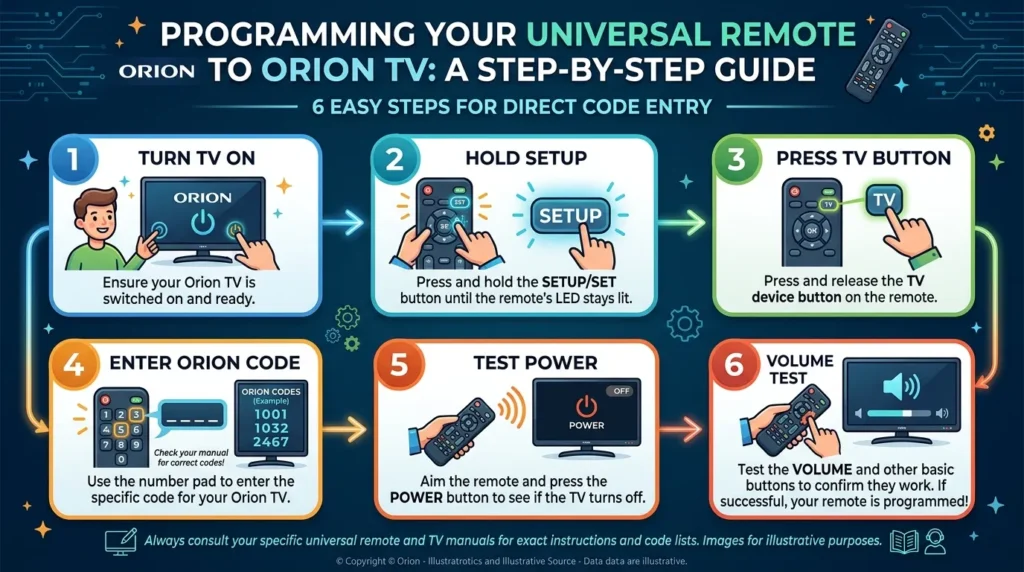
Step 1: Turn on your Orion TV manually using the power button on the TV itself.
Step 2: Press and hold the SETUP button on your remote. Hold for 2 seconds until the red LED light stays on. Release the button. The LED should remain lit.
Step 3: Press the TV button on your remote once. The LED will blink once then stay on.
Step 4: Enter your 4-digit code using the number buttons. Enter all digits within 5 seconds. The LED will turn off after the last digit.
Step 5: Point the remote at your TV and press the POWER button once. If your TV turns off, programming worked.
Step 6: Turn your TV back on and test the volume buttons. Press VOL+ and VOL-. If volume changes, programming is complete.
If your TV didn’t respond, repeat steps 1-6 with the next code on your list.
How to Test If Programming Worked
Test these functions in order:
- Power on/off — 3 times
- Volume up and down — 5 clicks each
- Channel up and down — 3 channels each
- Mute button — on and off
- Number buttons — enter channel 5, then 10
If all functions work, your remote is fully programmed. If only power works but not volume, the code is wrong. Try the next code.
Auto Code Search Programming Method
When to Use Auto Search Instead of Manual Entry
Use auto code search when:
- You tried all manual codes and none worked
- Your remote brand isn’t listed above
- Your Orion TV is from before 2010
- The LED blinks 4 times when you enter a code (invalid code signal)
Auto search takes 5 to 15 minutes but finds codes manual entry misses. This method works similarly to programming Insignia universal remotes when codes aren’t readily available.
Auto Search Steps for Orion TV
Step 1: Turn on your Orion TV.
Step 2: Press and hold SETUP until the LED stays on (2 seconds).
Step 3: Press TV button. The LED will blink once.
Step 4: Press and release the POWER button repeatedly. Wait 2 seconds between each press. The remote sends a new code with each press.
Step 5: When your TV turns off, immediately press ENTER or OK to save the code. Don’t press POWER again or you’ll skip past the working code.
Step 6: Test volume and channel buttons.
You’ll press POWER 50 to 200 times during auto search. Stop immediately when the TV responds.
Alternative Programming Method (Brand-Specific)
Programming Sky Remote for Orion (Special Method)
Sky remotes use a unique 4-step process.
Step 1: Press TV button on Sky remote.
Step 2: Hold down SELECT and red button together for 2 seconds. The red light will flash twice.
Step 3: Press buttons in this exact sequence: 9, 9, 1. Red light flashes twice.
Step 4: Enter code 0463 or 4665. Red light flashes twice if successful.
Test with volume buttons. Sky remotes often need code 4665 for newer Orion models.
Programming RCA Remote Without Codes
RCA remotes have a code-free method called Direct Code Entry.
Step 1: Turn on Orion TV.
Step 2: Press and hold CODE SEARCH until the LED stays on.
Step 3: Press TV button.
Step 4: Press POWER button repeatedly until TV turns off.
Step 5: Press ENTER immediately when TV turns off.
This works on RCA models RCR450, RCR815, and RCU404 from 2018 or newer. For detailed RCA programming methods, see our RCA universal remote codes tutorial.
Troubleshooting Universal Remote Programming
Remote Code Not Working – 5 Solutions
Solution 1: Try every code for your brand. Don’t stop after one fails. Some Orion models need the 6th or 7th code on the list.
Solution 2: Replace remote batteries. Weak batteries cause 30% of programming failures. Use fresh Duracell or Energizer batteries.
Solution 3: Reset your remote. Remove batteries for 60 seconds. Press every button twice while batteries are out. Reinsert batteries and try programming again.
Solution 4: Check if your Orion TV is actually a rebadged Sansui. Orion and Sansui share manufacturing. Try Sanyo universal remote codes as an alternative: 0463, 0171, 0141.
Solution 5: Verify your remote works. Point it at a phone camera and press any button. You should see a purple light through the camera screen. No light means your remote is broken.
LED Light Won’t Blink or Stay On
The LED behavior tells you what’s wrong.
LED doesn’t light at all: Dead batteries or broken remote. Replace batteries first.
LED blinks rapidly (4+ times): Invalid code entered. Double-check you pressed correct numbers.
LED stays on but won’t turn off: Remote stuck in programming mode. Remove batteries for 30 seconds to reset.
LED turns off too quickly: You’re entering code too slowly. Enter all 4 digits within 3 seconds.
Normal behavior: LED stays solid during setup, blinks once after each button press, turns off after valid code entry.
TV Turns Off But Remote Won’t Control Functions
This means the power code works but volume/channel codes don’t match.
Fix: The code is partially compatible. Try the next code on your list. Full compatibility gives you power, volume, channel, input, and menu control.
Some universal remotes separate power codes from function codes. Check your remote manual for “AUX code” or “secondary code” requirements. Similar issues occur with Hisense TV remotes and other brands.
Remote Loses Programming After Battery Change
Most remotes save codes in permanent memory. If yours doesn’t:
Temporary fix: Program your remote every time you change batteries.
Permanent fix: Upgrade to a remote with code memory. RCA RCR804 and One For All URC-7980 retain codes for 10 years even without batteries.
Don’t remove both batteries at once. Replace one battery at a time to maintain power to the memory chip.
Finding Your Remote Model Number
The model number is printed on your remote in one of four locations:
- Inside the battery compartment on a white sticker
- On the back of the remote in small gray text
- Under the battery cover on the plastic shell
- On the original packaging (if you kept it)
Model numbers start with letters (RCA, GE, URC, XR) followed by numbers. You need this to find exact codes. If you’re using budget remotes like Blackweb or Onn universal remotes, model numbers become critical for compatibility.
Orion TV Models and Compatible Codes
Current Orion TV Models (2024-2026)
Orion LED Series:
Models: SLED5515W, SLED4668W, SLED3975W
Best codes: 11905, 1905, 10463
Orion Smart TV Series:
Models: Android TV 43-inch, 50-inch, 55-inch
Best codes: 11463, 10463, 11905
Orion Roku TV:
Models: RLED43S
Use Roku remote app instead. Universal remotes don’t support Roku functions.
Older Orion TV Models (Pre-2024)
Orion CRT TVs (1990-2010):
Models: TV1329, TV2121, TV2526
Best codes: 463, 179, 0463
Orion LCD/LED (2010-2023):
Models: LED3241, DTV2784, TV32LB2000
Best codes: 0463, 1463, 10463
Orion TV/DVD Combos:
Models: C14DVD04SLTX, TVDVD091
Best codes: 0008, 10235, 1463
TV/DVD combos need two codes. Program TV code first, then DVD code separately using the DVD button on your remote. Similar setup applies to Zenith universal remotes for combo units.
Frequently Asked Questions
What is the most common Orion TV remote code?
Code 0463 works with 60% of universal remotes. If you only try one code, use 0463. For RCA remotes specifically, use 10463.
Why does my remote work for power but not volume?
You have a partial code match. The code controls power but not other functions. Try the next code on the list for full compatibility.
How many codes should I try before using auto search?
Try all codes for your specific remote brand first. That’s usually 4 to 8 codes. If none work, switch to auto search method.
Can I program multiple devices on one universal remote?
Yes. Use the TV button for your Orion TV and DVD/AUX buttons for other devices. Each button stores a different code independently. This works across all brands including Samsung, Sony, and Vizio remotes.
Do universal remotes work with Orion Smart TVs?
Basic functions work (power, volume, channel). Smart features (Netflix button, voice control, app navigation) require the original Orion remote or smartphone app.
Will my programmed remote work after a power outage?
Yes. Codes save in permanent memory. Power outages don’t erase programming. Only removing batteries might reset some cheap remotes.
What if auto search doesn’t find any working code?
Your remote may not have Orion codes in its database. This happens with generic no-name remotes. Buy a name-brand universal remote (RCA, GE, One For All) with updated code libraries.
How do I know which digit code my remote uses?
Check the number of digits displayed on your remote manual’s code list. Most remotes use one code length. Some newer remotes accept 3, 4, or 5-digit codes interchangeably.
Can I use a DirecTV remote on an Orion TV without DirecTV service?
Yes. DirecTV remotes work as universal remotes. Program using the TV button and code 10463. You don’t need active DirecTV service.
Why does the LED blink red 3 times after entering a code?
Three blinks means invalid code entry or code not in database. Verify you pressed correct numbers. If code is correct, it’s not compatible with your remote model. Try alternative brands like Element TV codes which share similar programming patterns.
Conclusion
Programming a universal remote for your Orion TV requires the correct code and proper entry sequence. Start with code 0463 for 4-digit remotes or 10463 for 5-digit remotes. Press and hold SETUP for 2 seconds, press TV, enter your code, and test with the power button. If one code fails, try the next on your brand-specific list. Auto code search works when manual entry doesn’t, but takes 10 minutes. Replace batteries if LED won’t light. Test volume and channel buttons to confirm full programming. Your remote saves codes permanently even after battery changes on quality remotes.
For other TV brands, explore our guides on Dynex, Daewoo, and Durabrand TV remote programming.


