

Setting up a universal remote for your Samsung TV can simplify control over multiple devices. This guide lists common codes and walks through the process step by step. Always check your remote’s manual for any brand-specific variations.

What You’ll Need Before Starting
- A compatible universal remote (brands like GE, RCA, Philips, or others).
- Your Samsung TV turned on.
- The model number of your TV, found on the back label or in Settings > Support > About this TV.
- Fresh batteries in the remote.
Ways to Program the Remote
You can pair the remote using a code or by searching automatically. Some methods require the original Samsung remote for learning functions.
Manual Code Entry
This approach uses a specific code for your TV.
- Turn on your Samsung TV.
- Press the TV button on the universal remote.
- Hold the Setup button until the red light stays on.
- Enter one of the codes from the list below.
- If the light blinks twice, test the power button. If the TV responds, you’re set. If not, try the next code.
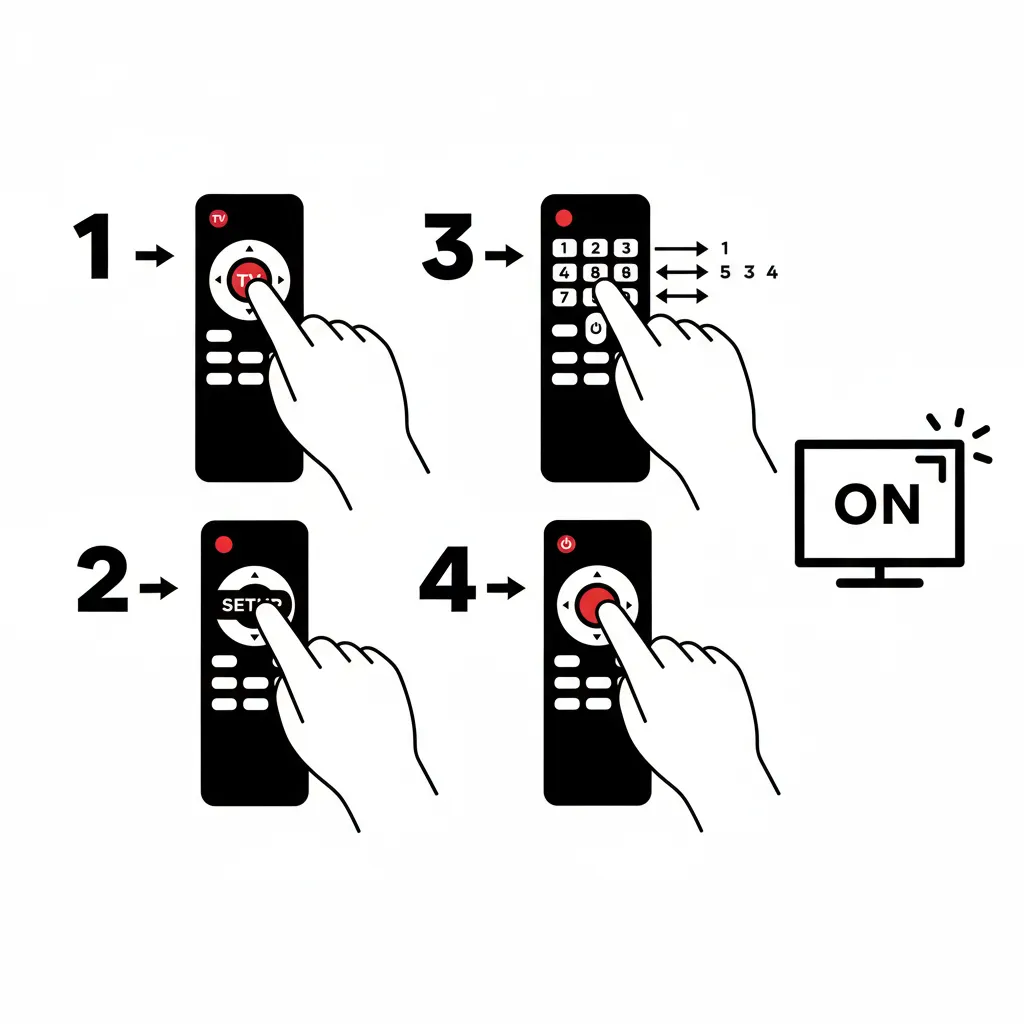
Auto Code Search
If manual entry doesn’t work, let the remote scan for the right code.
- Power on the TV.
- Press the TV button.
- Hold Setup until the light blinks twice.
- Enter 991 (or a similar search code for your remote).
- Press the power button repeatedly until the TV turns off.
- Press Setup to lock it in.
- Turn the TV back on and check other buttons like volume.
Also Read: Sony TV Universal Remote Codes Guide (Updated 2026)
Learning Mode for Functions
For remotes that support it, teach commands from the original remote.
- Activate learning mode on the universal remote.
- Place both remotes facing each other on a flat surface.
- Press a button on the universal remote to store.
- Press the matching button on the original.
- Test by pointing at the TV.
- Repeat for all needed buttons.
This method needs the original remote and takes time.
Common Universal Remote Codes for Samsung TVs
Codes differ by remote brand and TV model. Start with these and test them one by one. Pad shorter codes with zeros if your remote requires more digits.
3-Digit Codes
These are less common but used by some older remotes like GE or Philips.
- GE/Philips (CL3): 0001, 0101, 0251, 0261, 0331, 0351, 0531, 0571, 0711, 0781, 1191, 1221, 1311, 1501, 1911, 2071, 2141, 2721, 2741, 2961, 3301, 3321, 3471, 3561, 4011, 4941, 4961, 5471, 5521
- GE/Philips (CL4/CL5/CL6): 3301, 5791, 5801
4-Digit Codes
Widely used for brands like RCA, Onn, and Magnavox.
- General: 0009, 0019, 0030, 0037, 0056, 0060, 0093, 0178, 0217, 0370, 0448, 0556, 0587, 0618, 0644, 0702, 0774, 0812, 1060, 1235, 1249, 1458, 1506, 1584, 1619, 1630, 2051, 2103, 3131
- RCA: 0030, 0060, 0178, 0650, 0702, 0766, 0812, 0814, 1004, 1005, 1006, 1009, 1012, 1013, 1014, 1015, 1019, 1025, 1046, 1056, 1065, 1069, 1078, 1082, 1083, 1102, 1104, 1105, 1106, 1123, 1124, 1171, 1172, 1194, 1196, 1201, 1204, 1205, 1207, 3993
- Onn: 0007, 0012, 0104, 0106, 0172, 1773, 1957, 2355, 2481, 2482, 3528, 4108, 4111
- Magnavox (MC345): 0031, 0032, 0033, 0034, 0038, 0047, 0095, 0102, 0132
- Magnavox (MC348): 0037, 0147, 0335, 0437, 0538, 0624, 0625, 0895, 0997
- GE: 0004, 0009, 0012, 0015, 0076, 0080, 0085, 0104, 0105, 0106, 0109, 0172, 0358, 0942
- Philips: 0002, 0012, 0102, 0103, 0110, 0112, 0209, 0212, 0302, 0309, 0437, 0502, 0512, 0802, 0818, 0895
- One-For-All: 0019, 0030, 0056, 0060, 0093, 0178, 0587
5-Digit Codes
For remotes that need longer codes, like RCA or Xfinity.
- General: 10019, 10030, 10032, 10054, 10056, 10060, 10178, 10217, 10329, 10408, 10427, 10482, 10587, 10650, 10702, 10766, 10812, 10814, 11060, 11575, 11632, 11959, 12051
- RCA: 10030, 10054, 10056, 10060, 10178, 10650, 10702, 10766, 10812, 10814, 11060, 11632, 11959, 12051, 15371, 15386, 16616, 21818, 36218, 66611, 77114, 79113, 97817
- Onn: 14830, 16018, 1772
- Xfinity: 10019, 10030, 10032, 10056, 10178, 10217, 10329, 10408, 10427, 10482, 10587, 10650, 10702, 10766, 10812, 10814, 11060, 11575, 11632, 11903, 11959, 12268, 12280, 12281, 12284
- Spectrum: 10060, 10178, 10766, 10814, 11480, 11959, 12051, 13993
Codes for Sky Remotes
These vary by Sky remote version.
- Version 4: 0037, 0065, 0100, 0245, 0318, 0476, 0584, 0615, 0646, 0672
- Version 6: 0037, 0065, 0100, 0245, 0510, 0584, 0615, 0646, 0672, 1935
- Version 8: 0584, 0615, 0646, 0730, 0840, 1227, 1277, 1295, 1340, 1523
- Version 9: 0584, 0615, 0646, 0840, 1340, 1486, 1523, 1658, 2079, 2122
- Version 10: 0584, 0646, 0840, 1486, 1658, 2079, 2122, 2688, 2837, 3159
Troubleshooting Common Issues
If the remote doesn’t respond:
- Replace the batteries.
- Ensure no objects block the TV’s sensor.
- Restart the TV by unplugging it for 30 seconds.
- Use your phone’s camera to check if the remote sends an IR signal (look for a flash).
- If codes fail, confirm the remote model and try auto search again.
- For ongoing problems, visit the remote manufacturer’s site for more help.
As an alternative, consider the SmartThings app on your phone for control without a physical remote.
With these steps and codes, you should get your universal remote working smoothly with your Samsung TV. If your model needs a unique code, check the remote’s manual or online tools for exact matches.
Explore more:


