

The Fire Stick doesn’t come with local channels built in. There’s no tuner, no antenna port, and no automatic access to ABC, NBC, CBS, or FOX. But getting those channels is straightforward once you know which method fits your setup.
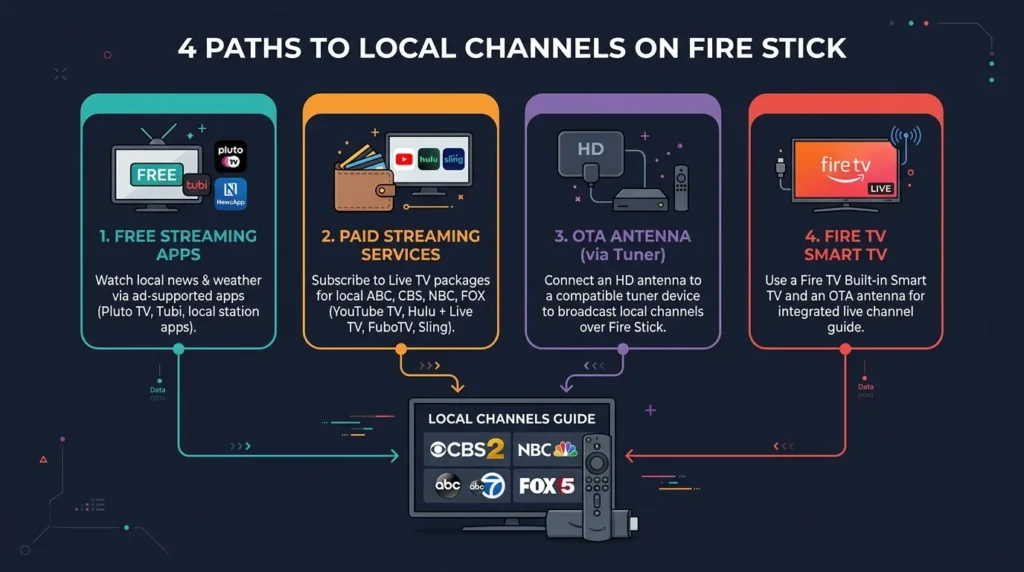
There are four ways to do it: free streaming apps, paid live TV services, an OTA antenna paired with a network tuner, or — if you own a Fire TV Smart TV — a direct antenna connection. This guide covers all four with current 2026 pricing and hardware recommendations.
What You Need to Know First
Fire Stick vs. Fire TV Smart TV
The standard Amazon Fire Stick (4K, 4K Max, Lite) is a streaming dongle. It has no coaxial input. It cannot pick up over-the-air broadcasts on its own.
A Fire TV Smart TV is different. These televisions have a built-in Fire OS interface and a physical coaxial input on the back. You can plug an antenna directly into the TV and run a channel scan — no extra hardware needed.
If you own a Fire Stick dongle rather than a Fire TV Smart TV, you need either an app, a paid streaming service, or an external network tuner to access local channels. If you’re also wondering whether you even need a Fire Stick with a Smart TV you already own, see our guide on do you need a Fire TV Stick with a Smart TV.
The Fire TV Recast Is Discontinued
Amazon’s Fire TV Recast — a DVR device that connected your antenna to your Fire Stick — was discontinued. Amazon officially ended support in 2026. Do not buy one secondhand. The HDHomeRun and Tablo are the current alternatives.
Method 1 — Free Streaming Apps (No Extra Hardware)
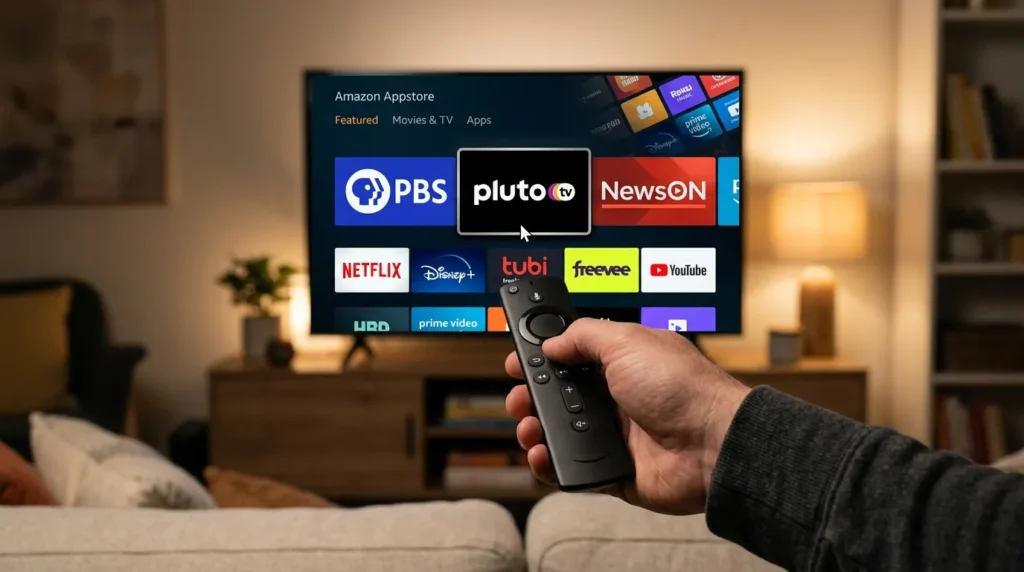
This is the fastest option. Several apps on the Amazon Appstore give you free access to local content — no antenna, no subscription, no extra equipment. For a full breakdown of everything free on the platform, see our complete Amazon Fire Stick free channels list.
NewsON
NewsON provides live and on-demand local news from over 200 local TV stations across the US. Search “NewsON” in the Amazon Appstore and install it. Enter your zip code and it shows which local stations are available in your area. Completely free.
Local Now
Local Now offers free live local news, weather, and sports from local TV stations. It also includes national news channels. Free with ads — no login required.
Network Apps (ABC, NBC, CBS, FOX)
Each major network has its own app on the Amazon Appstore:
- ABC app — free live local ABC affiliate in select markets with a TV provider login. Limited free content without login.
- NBC app — same model. Some local content free, full access requires a cable or streaming login.
- CBS app / Paramount+ — CBS content is now inside Paramount+. A free tier exists with ads. See the full Paramount+ channels list for what’s included.
- FOX app — free live FOX in most markets. One of the better free network apps.
- The CW app — 100% free. No login required. Full episodes on demand.
PBS App
The PBS app is completely free with no TV provider login needed. It carries full episodes from PBS stations across the country. If you watch any PBS content — news, documentaries, educational programming — install this first.
Pluto TV and Tubi
These are free ad-supported streaming platforms. Pluto TV has dedicated local news channels organized by city — see the full Pluto TV channel list to find what’s available in your area. Tubi carries local news content from partners including Fox Television Stations — browse the complete Tubi TV channels list for the full lineup. Neither requires an account to watch.
Amazon News (Built-In)
The Fire Stick home screen includes an Amazon News section. It aggregates local and national news clips. It’s not a live broadcast but works as a quick news feed without installing anything extra.
Method 2 — Live TV Streaming Services (Best Local Channel Coverage)
If you want all your local channels live — news, weather, primetime, sports — a paid live TV streaming service is the most reliable option. Every service below works directly on Fire Stick via its app in the Amazon Appstore. For a deeper look at which services cover the most ground, see our guide to the best streaming services for local channels.
Before subscribing, always check local channel availability by zip code on each service’s website. Local channel lineups vary by market.
| Service | Monthly Price (2026) | Local Channels | Free Trial |
|---|---|---|---|
| YouTube TV | $72.99 | ABC, NBC, CBS, FOX (most markets) | None currently |
| Hulu + Live TV | $82.99 | ABC, NBC, CBS, FOX (most markets) | None currently |
| FuboTV | $84.99+ | ABC, NBC, CBS, FOX, regional sports | 7 days |
| DirecTV Stream | $69.99+ | ABC, NBC, CBS, FOX (select markets) | 5 days |
| Sling TV | From $40 | FOX and NBC on select plans; CBS limited | 3 days |
YouTube TV is the top pick for most cord-cutters. It covers ABC, NBC, CBS, and FOX in the majority of US markets and includes unlimited cloud DVR storage. Browse the full YouTube TV channels list to see everything included in the plan.
Hulu + Live TV bundles Disney+ and ESPN+ into the price, which makes the higher cost easier to justify if you use those services. The full Hulu TV channels list shows the complete lineup.
FuboTV leads on sports coverage. The full FuboTV channels list covers all available networks by plan tier.
Sling TV is the cheapest option but has the weakest local channel coverage. CBS is largely absent. NBC and FOX are on specific plans. Check the full Sling TV channels list and verify your zip code before signing up. Sling also offers a free tier — the Sling Freestream channels list covers what’s available at no cost.
Method 3 — OTA Antenna + Network Tuner (Free Channels Forever)
This method takes more setup time but costs nothing after the initial hardware purchase. You get every local broadcast channel your antenna can receive — completely free, forever.
How It Works
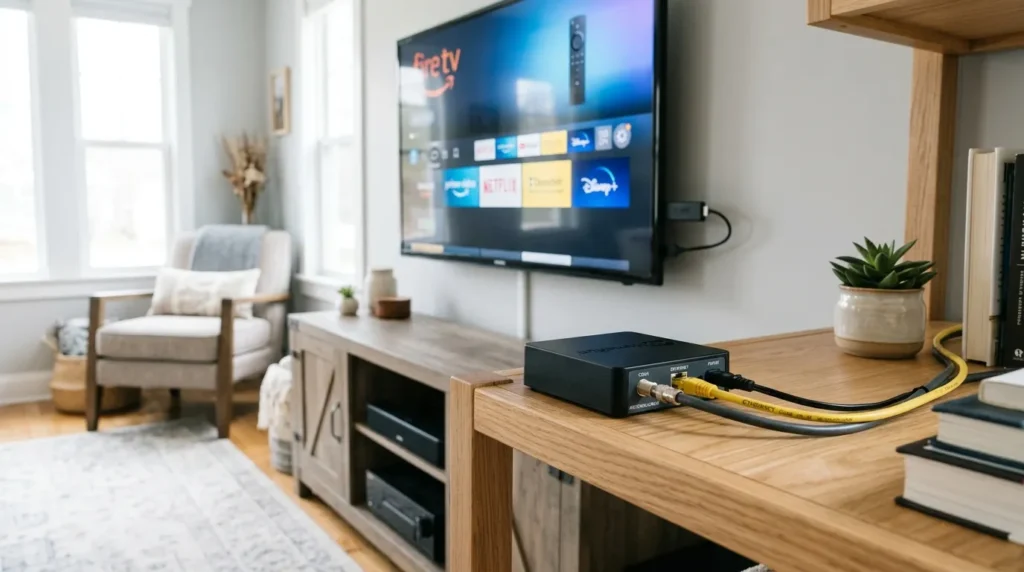
You connect an HD antenna to a network tuner device. The tuner connects to your home Wi-Fi. Its app on the Fire Stick picks up the tuner’s signal and displays live OTA channels on your TV. No monthly fees after setup.
HDHomeRun (Recommended for 2026)
The HDHomeRun Flex 4K is the best network tuner for Fire Stick users in 2026. It supports 4K ATSC 3.0 broadcasts where available and streams up to four channels simultaneously. The HDHomeRun app is available directly in the Amazon Appstore.
Setup steps:
- Connect your HD antenna to the HDHomeRun via coaxial cable
- Connect the HDHomeRun to your router via Ethernet
- Install the HDHomeRun app on your Fire Stick
- Open the app and run a channel scan
That’s it. Every channel your antenna receives appears in the app.
Hardware cost: HDHomeRun Flex 4K retails around $99–$149. A decent indoor HD antenna runs $25–$50.
Tablo
Tablo is a competing OTA DVR and tuner brand. The Tablo ATSC 3.0 device works similarly to HDHomeRun and also has a Fire Stick app. Tablo includes basic DVR features. Some advanced DVR features require a subscription ($2.99–$5.99/month). Hardware costs are comparable to HDHomeRun.
Antenna Placement Tips
Signal quality determines which channels you receive. Place your antenna:
- Near a window facing the direction of your local broadcast towers
- As high as possible in the room
- Away from large metal objects and thick walls
Use AntennaWeb.org or TVFool.com to find your nearest broadcast towers and see which channels are receivable at your address.
Method 4 — Fire TV Smart TV (Built-In Antenna Input)
If your television is a Fire TV Smart TV — sold by Amazon and brands like Toshiba, Insignia, Pioneer, and Westinghouse with Fire OS built in — you can skip the network tuner entirely.
These TVs have a coaxial input on the back. You plug your antenna directly into the TV.
Setup steps:
- Connect your HD antenna to the TV’s coaxial input
- On the home screen, navigate to Settings
- Select Live TV
- Select Set Up Antenna
- Run a Channel Scan
The TV scans for available OTA broadcasts and adds them to your channel guide. Channels appear inside the Fire TV interface just like any streaming app. You can browse them from the Live tab on the home screen.
No app, no tuner device, no Wi-Fi required for this step. Just antenna + TV.
If you’re deciding whether to add a separate Fire Stick to a TV you already own, our guide on do you need a Fire TV Stick for each TV covers when it makes sense.
Which Method Is Right for You?
| Your situation | Best method |
|---|---|
| Want free channels, no extra hardware | Free apps: NewsON, Local Now, PBS, FOX app |
| Want free channels, willing to buy hardware | OTA antenna + HDHomeRun (~$125–$200 one-time) |
| Want all locals live + sports + DVR | YouTube TV ($72.99/mo) or Hulu + Live TV ($82.99/mo) |
| Own a Fire TV Smart TV | Direct antenna connection — no extra equipment |
| On a tight budget, need some locals | Sling TV from $40/month — check zip code first |
Frequently Asked Questions
Can I get local channels on Fire Stick for free? Yes. NewsON, Local Now, Pluto TV, PBS, and the FOX app are all free on the Amazon Appstore. No subscription needed. Coverage depends on your location.
Do I need an antenna for Fire Stick? No. An antenna is one option but not a requirement. Most major local networks are accessible through free apps or paid live TV services without any antenna hardware.
Which Fire Stick models support local channels? All current Fire Stick models support local channels through streaming apps and paid services: Fire Stick Lite, Fire Stick 4K, and Fire Stick 4K Max. For OTA antenna access, you need an external tuner like HDHomeRun on any model. Only Fire TV Smart TVs have a direct coaxial input.
Why can’t I find my local channels on Fire Stick? Three common causes: your zip code isn’t covered by the streaming service you’re using, the app you installed doesn’t carry your specific local affiliate, or — for antenna setups — your antenna signal is too weak. Try repositioning your antenna or use AntennaWeb.org to verify which channels are receivable at your address.
Does Sling TV have local channels? Partially. Sling TV carries NBC and FOX on certain plans in select markets. CBS coverage is very limited. ABC availability depends on your market. Sling is the weakest of the major live TV services for local channel coverage. Check your zip code on Sling’s website before subscribing.
What happened to the Fire TV Recast? Amazon discontinued the Fire TV Recast and ended support in 2026. It is no longer a viable option. The HDHomeRun Flex 4K is the recommended replacement for OTA recording and streaming to Fire Stick.


