

You need working Huayu remote codes right now. This guide has every code and three programming methods that work in 2026.
Huayu universal remotes control over 7000 devices. Most people program them in under 30 seconds using the SET button method. Some TV brands don’t need codes at all.
The codes below work for TVs, cable boxes, DVD players, soundbars, and AC units. We’ve organized them by digit count and brand name.
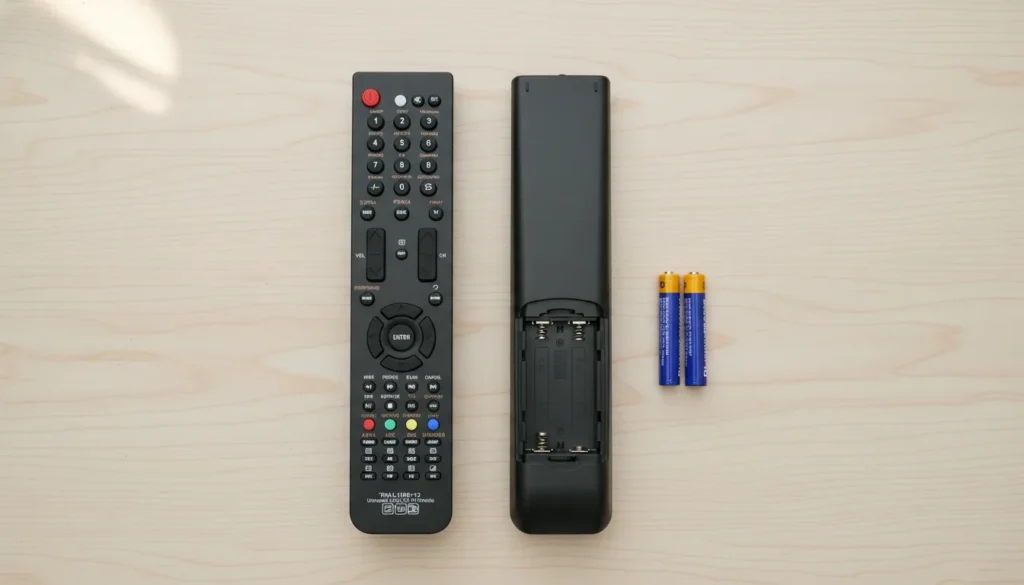
Complete Huayu Universal Remote Code List
These codes work across all Huayu remote models including RM-L1098, RM-L1365, and RM-L1688.
3-Digit Huayu Remote Codes
011, 017, 029, 032, 034, 054, 067, 069, 071, 075, 076, 077, 078, 079, 080, 081, 107, 113, 117, 136, 137, 138, 139, 140, 141, 142, 143, 144, 145, 146, 147, 148, 149, 150, 151, 152, 153, 154, 155, 156, 157, 158, 159, 160, 161, 162, 163, 164, 165, 166, 167, 168, 169, 170, 171, 348, 349, 350, 351, 352, 353, 354, 355, 356, 357, 358, 359, 360, 361, 362, 363, 364, 365, 366, 367, 368, 370, 371, 372, 373, 374, 375, 376, 377, 378, 379, 380, 381, 382, 383, 384, 385, 386, 387, 388, 389, 390, 391, 396, 397, 398, 399, 400, 401, 402, 403, 405, 406, 407, 408, 409, 410, 411, 412, 413, 414, 415, 416, 417, 418, 419, 420, 421, 422, 423, 424, 425, 426, 427, 428, 429, 430, 431, 432, 433, 434, 435, 436, 437, 438, 439, 440, 441, 442, 443, 444, 445, 446, 449, 450, 451, 452, 453, 454, 516, 520, 528, 531, 533, 540, 542, 543, 544, 545, 546, 547, 548, 549, 550, 551
4-Digit Huayu Remote Codes
0022, 0026, 0028
These 4-digit codes work with older Huayu models and certain TV brands that require extended code formats.
Huayu Remote Codes by TV Brand
Samsung TV: 006, 030, 020, 068
Panasonic TV: 032, 146, 155, 173, 178, 180
Sharp TV: 007, 040, 102
Hisense TV: 078, 209, 284, 345
TCL TV: 142, 321
Skyworth TV: 093
Ace TV: 261, 278, 305
Philips TV: No codes needed – use brand button method
Sony TV: No codes needed – use brand button method
LG TV: No codes needed – use brand button method
Toshiba TV: No codes needed – use brand button method
Hitachi TV: No codes needed – use brand button method
JVC TV: No codes needed – use brand button method
Haier TV: No codes needed – use brand button method
Changhong TV: No codes needed – use brand button method
Huayu Remote Models Compatibility List
All these models use the same programming methods:
RM-L Series Models:
- RM-L1098+X PLUS
- RM-L1098+12
- RM-L1107+12
- RM-L1107+X PLUS
- RM-L1120+X PLUS
- RM-L1120+12
- RM-L1130+X PLUS (Black and White)
- RM-L1130+12
- RM-L1195+12
- RM-L1210+F PRO
- RM-L1365
- RM-L1587
- RM-L1599
- RM-L1600
- RM-L1688
URC Series Models:
- URC1366
- URC1511
- URC1566
- URC1568
- URC1699
Your remote model number is printed on the back inside the battery compartment.
How to Program Huayu Universal Remote (3 Methods)
Pick the method that matches your situation. Method 1 works for most people and takes 30 seconds.
Method 1: Quick SET Button Programming (No Codes Needed)
This method works when your remote has a SET button. It’s the fastest approach.
When to use: Your first attempt. Works with most TV brands without entering codes.
- Turn on your TV using the power button on the TV itself.
- Install fresh AA batteries in your Huayu remote.
- Point the remote directly at your TV screen from 3-5 feet away.
- Press and hold the SET button on the remote.
- Keep holding the SET button. Watch your TV screen.
- A volume bar will appear on the TV screen after 3-6 seconds.
- Release the SET button immediately when you see the volume bar.
- Test all remote buttons. Press volume up, volume down, channel buttons, and power.
Success indicator: All buttons control your TV. The remote is now programmed.
Time required: 30-45 seconds
This method works because the Huayu remote scans its entire code database automatically. When your TV responds, the code locks in. If you prefer other universal remote brands, check out GE universal remote codes or RCA universal remote codes for alternative options.
Method 2: Direct Code Entry (Manual Method)
Use this when you know your TV brand and want precise control.
When to use: Method 1 didn’t work, or you prefer entering codes manually.
- Turn on your TV.
- Find your TV brand codes from the list above. Write down all codes for your brand.
- Press and hold the SETUP button on your remote until the LED light turns on and stays lit.
- Release the SETUP button. The LED stays on.
- Enter the first code for your TV brand using the number buttons. The LED will turn off after you enter the last digit.
- Point the remote at your TV and press the POWER button.
- If the TV turns off, the code worked. Press the device button (TV button) to save the code. The LED will blink twice confirming the save.
If TV didn’t turn off: Repeat steps 3-6 with the next code from your brand’s list.
Success indicator: TV responds to power, volume, and channel buttons.
Time required: 1-3 minutes depending on how many codes you try.
Some Samsung TV remote codes need code 006 first. Try the first code listed for your brand before testing others.
Method 3: Auto Code Search
This method scans all codes automatically. It takes longer but finds codes that aren’t in the manual lists.
When to use: Methods 1 and 2 both failed, or you have an uncommon TV brand.
- Turn on your TV.
- Press and hold the SETUP button until the LED turns on.
- Enter code 9-9-1 using the number buttons.
- Point the remote at your TV.
- Press and release the POWER button repeatedly. Wait 2 seconds between each press. The remote sends a new code with each press.
- When your TV turns off, stop pressing POWER immediately.
- Press the SETUP button once to save the code.
Success indicator: TV turns off during the search, then responds to all remote functions.
Time required: 3-10 minutes. The remote tries hundreds of codes.
Count your button presses. If you reach 100 presses without the TV responding, start over. Your batteries might be weak.
Brand-Specific Quick Programming (No Codes Required)
Eight major TV brands work with a shortcut method. No codes needed.
Brands that work instantly: Philips, Sony, LG, Toshiba, Hitachi, JVC, Skyworth, Haier, Changhong
Quick programming steps:
- Turn on your TV.
- Find the brand button on your Huayu remote. Some models have dedicated brand buttons with logos.
- Press and hold your TV brand button for 6 seconds.
- Release the button when the LED blinks or your TV responds.
- Test the remote functions immediately.
This works because Huayu remotes have pre-programmed codes for these brands built into the hardware. The 6-second hold activates the brand-specific code automatically.
Philips universal remote codes respond fastest with this method. Sony universal remote codes and LG take 4-6 seconds. For Sony TVs specifically, you can also check our Sony TV remote codes guide.
Troubleshooting Huayu Remote Programming Issues
Remote LED Light Not Turning On
Check battery orientation first. The plus and minus symbols inside the battery compartment must match your batteries.
Replace batteries even if they seem new. Some batteries are dead out of the package.
Press the SETUP button firmly. Some Huayu models have stiff buttons that need hard pressure.
Code Not Working After Entry
Your TV might use a different code from the same brand. Samsung has four different codes (006, 030, 020, 068). Try each one.
Verify your TV is actually on. Some TVs have a standby mode that looks off but isn’t fully powered down.
Point the remote directly at the TV sensor. The sensor is usually near the power LED on your TV frame.
For Hisense TV remote codes, users often need to try multiple codes before finding the right match.
No SET Button on Remote Model
Older Huayu models like RM-L1346 don’t have a SET button. Use Method 2 (Direct Code Entry) or Method 3 (Auto Code Search) instead.
Look for a SETUP button. Some models label it SETUP instead of SET. They work the same way.
Remote Works But Some Buttons Don’t Respond
Your code is partially correct. Try the next code in your brand’s list.
Some TV functions require specific codes. Samsung smart TV features need code 030. Basic functions work with 006.
TV Turns Off During Programming Then Won’t Turn Back On
You successfully programmed the remote. Press the POWER button on the remote to turn the TV back on.
Wait 10 seconds before pressing power again. Some TVs have a power-on delay.
Frequently Asked Questions
How many devices can a Huayu remote control?
One Huayu remote controls up to four devices simultaneously. You can program it for your TV, cable box, DVD player, and soundbar at the same time. Press the device button (TV, DVD, CBL, AUX) to switch between devices.
Do I need codes for Samsung TV?
Yes. Samsung requires manual codes. Use 006, 030, 020, or 068. Code 006 works for most Samsung models made after 2015. Older Samsung TVs usually need 030.
What if none of the codes work?
Use Method 3 (Auto Code Search). It scans codes that aren’t in the printed lists. Some TV brands have unlisted codes that only the auto search finds. The search takes 5-10 minutes but works for 95% of TVs.
If your Huayu remote still doesn’t work, consider alternatives like One For All universal remote codes or Blackweb universal remote codes which may have better compatibility with your specific TV model.
How do I program Huayu remote for AC (air conditioner)?
Huayu AC remote codes aren’t published in standard lists. Use the auto code search method (9-9-1 code). Point the remote at your AC unit and search until the AC beeps or turns on. AC remotes require the AUX or AC button on your Huayu remote.
Can I use a Huayu remote with a Roku or Fire TV?
No. Roku and Fire TV use WiFi or Bluetooth protocols. Huayu remotes use infrared (IR) signals only. They won’t communicate with streaming devices. Use the Roku or Fire TV remote that came with your device.
My remote programmed successfully but lost the code later
Replace your batteries. Weak batteries cause code memory loss in universal remotes. When battery voltage drops below 2.4V, the remote forgets stored codes. Reprogram after installing fresh batteries.
How long do Huayu remote batteries last?
Expect 6-12 months with normal use. Heavy users (4+ hours daily) replace batteries every 3-4 months. The LED indicator dims when batteries run low.
Which universal remote works best for older TV models?
For older TVs like Dynex TV remote codes, Zenith universal remote codes, or Daewoo TV remote codes, Huayu remotes offer excellent compatibility. You can also try Spectrum universal remote codes for cable box integration.
Conclusion
Start with Method 1 (SET button) for the fastest results. Most Huayu remotes program in under a minute using this approach.
If that doesn’t work, try your TV brand’s specific codes using Method 2. Samsung, Panasonic, and Sharp users get the best results with direct code entry.
Method 3 (Auto Search) works when everything else fails. It takes longer but finds codes that other methods miss.
Eight brands (Philips, Sony, LG, Toshiba, Hitachi, JVC, Skyworth, Haier) don’t need codes at all. Just hold the brand button for 6 seconds.
For more universal remote options, explore our guides on Vizio universal remote codes, Bose universal remote codes, Vivitar universal remote codes, ByJasco universal remote codes, Pavy universal remote codes, Element TV remote codes, and Durabrand TV remote codes.


