

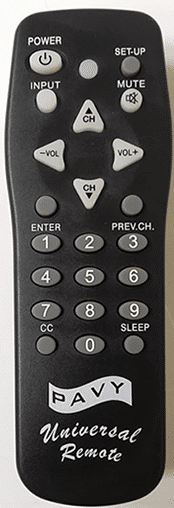
Pavy universal remotes let you manage several home entertainment devices from one unit. They support TVs, DVD players, cable boxes, and more. Setup involves entering codes or using search functions. This post gathers all key details, methods, and codes in one spot for easy reference.
What Makes Pavy Remotes Useful
These remotes cut down on clutter by replacing multiple controls. They pair with major brands through specific three-digit codes. Models like PV-11 offer simple buttons for device selection. Always start with fresh batteries to avoid issues.
Step-by-Step Programming Methods
Follow these approaches to link your remote. Methods work for TVs, DVDs, VCRs, audio systems, cable, and satellite boxes.
Manual Code Entry
Power on the device first. Select the matching button on the remote, such as TV or DVD. Hold the setup button until the LED flashes or stays lit. Input a three-digit code from the brand list. Aim the remote at the device and hold the power button. Release when the device shuts off. Test volume and channels. If it does not respond, use another code.
Auto Code Search
Switch on the target device. Press and hold the device button for three seconds until the LED signals ready. Point the remote and tap channel up or down one at a time. Stop when the device powers off. Hit the power button to check if it turns back on. Press the device button to lock in the code. The LED blinks twice as confirmation.
Code Search Option
Turn the device on. Hold setup on the remote. Enter 9-9-1 using the numbers. Keep the power button pressed while hitting channel up repeatedly. Let go when the device turns off. This sets basic functions.
Full List of TV Codes by Brand
Try codes in sequence for your brand. Lists come from reliable guides and may vary by model.
- Admiral: 500, 501, 610, 614, 615, 902
- Advent: 911, 932, 933
- Aiko: 900
- Akai: 601
- AOC: 103, 601, 617
- Apex: 000, 604, 618
- Audiovox: 100, 101, 900, 901
- Bell & Howell: 611, 620
- Bradford: 901
- Broksonic: 614, 902
- Candle: 601, 619
- Celebrity: 605
- Changhong: 618
- Citizen: 601, 619, 900, 903
- Clairtone: 103
- Concerto: 619
- Contec: 103, 901
- Craig: 901
- Crosley: 301, 303
- Crown: 901
- Curtis Mathes: 100, 102, 301, 400, 401, 402, 405, 500, 603, 606, 611, 619, 620, 621, 903
- CXC: 901
- Daewoo: 100, 101, 617, 900
- Daytron: 617
- Dumont: 617, 700
- Durabrand: 201, 614, 615, 914, 918
- Electroband: 103, 605
- Emerson: 101, 103, 200, 201, 620, 901, 902
- Envision: 601
- ESA: 201, 601, 901, 903
- Fisher: 620, 801
- Fujitsu: 300, 615
- Funai: 201, 615, 901
- Futuretec: 901
- GE: 100, 200, 202, 400, 401, 402, 405, 607, 608, 802
- Gibralter: 601, 617, 700
- Goldstar: 601, 607, 617, 619
- Grundy: 615, 901
- Haier: 914, 918
- Hallmark: 607
- Harvard: 901
- Hitachi: 005, 606, 611, 916, 619
- ILO: 921, 925
- Infinity: 301
- Insignia: 201, 301, 303, 614, 909, 919, 920, 934
- Inteq: 700
- JBL: 000, 301, 604, 618
- JCB: 605
- JC Penny: 202, 400, 402, 405, 601, 607, 608, 609, 617, 800, 903
- JVC: 701
- KEC: 901
- Kenwood: 601, 617
- KLH: 618
- Konka: 001, 002, 003, 304, 904
- KTV: 103, 601, 901
- LG: 619, 700, 910
- Logik: 611
- Luxman: 619
- LXI: 301, 400, 402, 607, 609, 620
- Magnavox: 301, 302, 303, 601, 615, 617, 803, 905, 906, 907, 908, 909
- Majestic: 611
- Marantz: 301, 601
- Matsushita: 004
- Megatron: 606, 607
- MEI: 103
- Memorex: 004, 104, 607, 611, 614, 615, 620
- MGA: 104, 500, 601, 607, 617
- Minutz: 608
- Mitsubishi: 104, 500, 601, 607, 617
- Motorola: 500, 802
- MTC: 103, 601, 617, 619, 903
- Multitech: 901
- NAD: 603, 607, 609
- NEC: 601, 617, 619
- Nikko: 601, 607, 900
- NTC: 900
- Olevia: 923
- Onwa: 901
- Optimus: 004, 603, 620
- Optonica: 500, 610
- Orion: 614, 615, 902
- Panasonic: 004, 202, 610, 802
- Philco: 301, 601, 606, 614, 617
- Philips: 301, 601, 617, 803, 905, 906, 907, 908, 909
- Pilot: 601, 617
- Pioneer: 600, 603
- Polaroid: 400, 910, 913, 915, 917, 920
- Portland: 617, 900
- Prism: 202
- Proscan: 400, 402
- Proton: 102, 607
- Pulsar: 617, 700
- Quasar: 004, 202, 610, 802
- RadioShack: 400, 402, 607, 610, 617, 619, 620, 621, 901
- RCA: 100, 200, 400, 402, 405
- Rhapsody: 103
- Runco: 601, 616, 700
- Samsung: 601, 607, 617, 619, 903, 930
- Sansui: 614, 615, 902
- Sanyo: 620, 801, 931
- Scotch: 607
- Scott: 607, 615, 617, 901, 902
- Sears: 201, 301, 400, 402, 607, 609, 615, 620, 622, 801
- Sharp: 500, 501, 610, 929
- Shogun: 617
- Signature: 611
- Simpson: 803
- Sony: 605
- SSS: 617, 901
- Starlite: 901
- Supreme: 605
- Sylvania: 201, 301, 601, 901
- Symphonic: 201, 901
- Tandy: 500
- Tatung: 802
- Technics: 004, 202
- Techwood: 202, 619
- Teknika: 104, 301, 605, 611, 615, 617, 619, 900, 901
- TMK: 602, 607, 619
- Toshiba: 609, 613, 620, 903
- Trutech: 101
- Victor: 701
- Vidtech: 607, 617
- Vizio: 927
- Wards: 301, 601, 607, 608, 610, 611, 615, 617, 619
- Westinghouse: 926, 928
- White Westinghouse: 101, 605, 614
- Yamaha: 601, 617
- Zenith: 611, 614, 619, 700, 900
Codes for Other Devices
Pavy remotes handle DVDs, VCRs, audio, cable, and satellite with similar methods. Specific codes depend on brand. Use the TV list for overlapping brands or auto search if needed. For example, audio brands like Yamaha use 601 or 617. Cable boxes often work with GE or RCA codes from above. Check your device manual for matches.
Common Issues and Fixes
No response? Swap batteries. Wrong code? Test others. Remote forgets settings? Reset by removing batteries, hold power for 30 seconds, then reprogram. Blocked signal? Clear path between remote and device. Some hotel TVs block changes. If auto search fails, manual entry often works better for older models.
Check similar guides:


