

Quick Answer
LG TV black screen fix: Unplug the TV from the wall, hold the physical power button on the TV for 30 seconds, wait 60 seconds, then plug it back in. If the screen stays black but you still have sound, shine a flashlight at the panel in a dark room. A faint visible image means the LED backlight has failed — a hardware repair issue. No image at all means a video path or software problem. Start with the power reset. It fixes the majority of black screen cases.
What Causes an LG TV Black Screen?
Black screens on LG TVs fall into two categories: software/settings problems you can fix yourself, and hardware failures that need a repair technician.
Software and Settings Causes
Energy Saving mode is the most overlooked cause. LG webOS has an aggressive Eco setting that can reduce the backlight to near-zero. The TV is technically on and playing audio, but the screen appears completely dark.
Wrong input source is just as common. If the TV is set to HDMI 2 but your device is connected to HDMI 1, you’ll see a black screen with nothing else. The menu will still appear.
Firmware bugs can corrupt display settings after an automatic update. Some LG webOS updates in 2024–2025 triggered black screens on C-series and G-series OLED models, fixable with a power reset or AV reset.
Software crashes can freeze the video pipeline while audio keeps running — the TV is working, it just can’t render the picture.
Hardware Causes
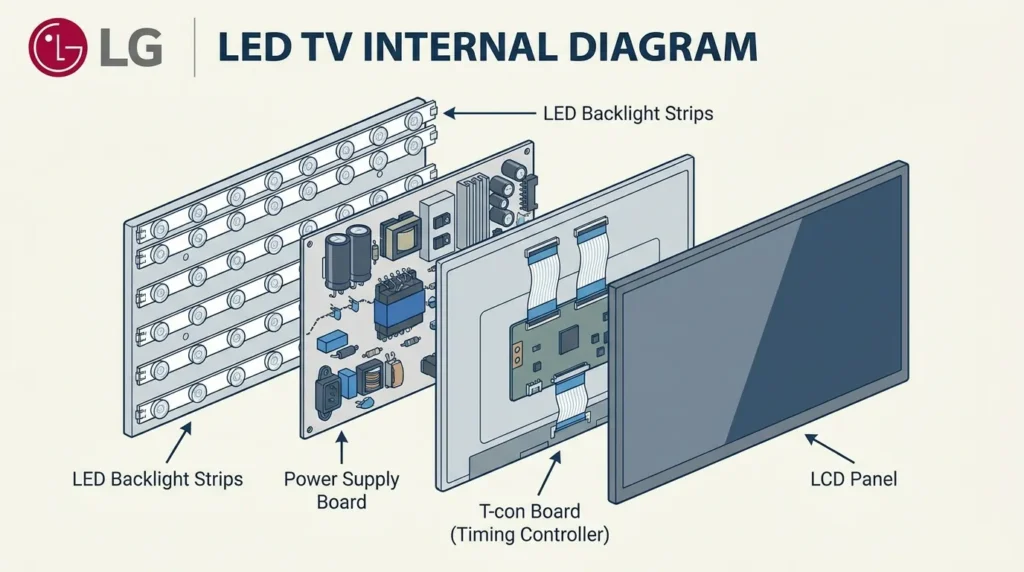
LED backlight failure is the most common hardware cause on LG LED/LCD TVs. The LED strips that illuminate the panel burn out, leaving the display dark even though the TV is generating a full image. This is confirmed by the flashlight test (see Step 3 below).
T-con board malfunction — the T-con (timing controller) board processes the video signal and tells the panel what to display. If it fails, the screen goes black even when the rest of the TV works normally.
Power supply board failure causes the TV to turn on (you might see the LG logo briefly) then go black. The power supply can’t sustain enough voltage to run the full display.
OLED panel degradation — on older LG OLED models (5–7+ years), the organic panel itself can fail. This is different from backlight failure because OLED panels are self-illuminating. Repair typically means a full panel replacement.
How to Fix LG TV Black Screen — Step-by-Step
Work through these steps in order. Most users fix the problem by Step 2 or 3.
Step 1 — Check Input Source and Cables
Press the Input or Source button on your remote and confirm the selected input matches where your device is connected. Try switching to a different HDMI port.
Unplug and firmly reseat every HDMI cable. A loose connector causes black screens that feel random. If you have a spare HDMI cable, swap it — damaged cables produce no signal.
If the TV’s own Home menu appears when you press the Home button, the TV is working and the problem is the input source, not the TV itself. Use our TV HDMI Port Selector tool to identify the right port for your setup.
Step 2 — Hard Power Reset (Do This First)
This is the single most effective fix for a software-caused black screen.
- Unplug the TV from the wall outlet — not just standby, full power cut.
- Hold the physical power button on the TV (not the remote) for 30 seconds. This discharges residual power from the capacitors.
- Wait a full 60 seconds.
- Plug back in and power on.
This clears software crashes, corrupted AV settings, and glitched firmware states. If you had a black screen after an update, this is the fix to try first. For LG-specific technical access, you can also check the LG TV service menu codes for advanced diagnostic options.
Step 3 — The Flashlight Test (Backlight Diagnostic)
This test tells you within 10 seconds whether the problem is hardware or software.
- Turn the TV on and play something with audio (Netflix, YouTube).
- In a dimmed room, hold your phone’s flashlight close to the screen at a slight angle.
- Look for a faint image — menus, tiles, movement.
If you see a faint image: The backlight has failed. The TV is generating a perfect picture — there’s just nothing to illuminate it. This is a repair-level hardware problem.
If you see nothing at all: The TV isn’t producing a video signal. Likely a T-con board, power supply, or software issue.
Step 4 — Disable Energy Saving / Eco Mode
If the flashlight test revealed a faint image, or if the screen appears very dim rather than completely black, this is worth checking before assuming a hardware failure.
Navigate to Settings → Picture → Energy Saving and set it to Off. Also check Settings → Picture → Picture Mode — switch to Standard or Vivid, which uses full backlight intensity.
On some LG webOS models, Energy Saving is buried under Settings → General → Eco Mode. Both paths lead to the same setting. You can also use the TV Picture Mode Optimizer to identify the best settings for your room and model.
Step 5 — Run an AV Reset on LG webOS
An AV reset restores all audio and video settings to their defaults without erasing your apps or account. It fixes black screens caused by corrupted picture configurations, especially after firmware updates.
On most LG webOS TVs: Settings → Support → Reset to Initial Settings → AV Reset (or Picture Reset on older models).
If you can’t navigate menus because the screen is black, try this blind sequence: press Home, count 3 seconds, press the down arrow twice, press OK, then navigate to Support. If you know your exact model, check our LG TV service menu codes guide — some models have a direct AV reset sequence.
Step 6 — Check for Firmware Updates
Outdated firmware causes display bugs. Updated firmware sometimes also introduces them — but an update usually also includes the fix.
Go to Settings → Support → Software Update → Check for Updates. If the screen is black and you can’t navigate, connect the TV to your network via ethernet and leave it powered on overnight. LG TVs download and install updates automatically.
If a recent automatic update caused the black screen, LG does allow firmware rollback on some models via the service menu.
Step 7 — Factory Reset LG TV
Use this as a last resort before calling a technician. A factory reset erases all settings, accounts, and installed apps, returning the TV to its out-of-box state.
Settings → General → Reset to Initial Settings → OK
If the screen is too dark to navigate: press Home on the remote, then use the LG ThinQ app on your phone to navigate settings if the TV and phone are on the same Wi-Fi. Alternatively, hold the physical power button on the TV for 10+ seconds — some LG models initiate a soft reset this way.
After a factory reset, if the black screen persists, the cause is hardware — not software. If your LG remote stops responding during this process, our fix for LG Magic Remote not working covers the full troubleshooting process.
LG TV Black Screen But Has Sound
This is the most common variant. The TV is on, you hear audio from Netflix or the menu click sounds, but the screen shows nothing.
What it means: The TV is functioning normally. Either the backlight has failed (LED/LCD models), the picture settings have gone to zero (Energy Saving), or the video signal path has a software glitch.
What to do:
- Do the hard power reset (Step 2).
- Run the flashlight test (Step 3).
- If the flashlight shows a faint image, it’s backlight failure — hardware repair needed.
- If no image shows at all with the flashlight, try the AV reset (Step 5) and factory reset (Step 7).
If you also have sound issues alongside this problem, see our guide on fixing LG TV sound not working — sometimes both symptoms share the same root cause.
The phrase that tells a repair technician everything they need to know: “LG TV has sound but no picture — flashlight test shows a faint image.” That single sentence diagnoses a backlight problem and rules out software issues.
LG TV Screen Flickers Then Goes Black
Flickering before a black screen usually means an unstable power supply, overheating, or a loose internal connection.
Check for overheating first. LG TVs throttle and shut off the display if internal temperatures get too high. Make sure there’s at least 4 inches of clearance on all sides. If the TV is mounted in a closed cabinet, that’s almost certainly the cause.
Loose HDMI cables cause flickering too. The HDMI handshake between the TV and an external device (soundbar, game console, cable box) can fail intermittently, causing flicker then black.
A failing T-con board produces a very specific pattern: the screen flickers, the image distorts, and then goes black for minutes at a time before recovering. This needs professional diagnosis.
If the flickering only happens during startup, it’s usually firmware — a factory reset or update resolves it in most cases. For a broader look at TV display problems, our fix TV no picture guide covers all major brands and failure types.
LG TV Black Screen After a Firmware Update
LG’s automatic webOS updates occasionally push corrupted AV configuration changes that leave the display black on reboot. This happened with notable frequency on OLED C2 and C3 models in 2024.
The fix is usually quick:
- Hard power reset (unplug, hold power button 30 seconds, wait 60 seconds).
- If screen returns: immediately go to Settings → General → Reset to Initial Settings → AV Reset.
- If screen stays black after power reset: factory reset.
- If factory reset doesn’t help: the update may have caused a deeper firmware corruption. Contact LG support and reference the firmware version number from the update log — LG has issued recovery firmware for affected batches.
To stop automatic updates causing this in the future: Settings → General → About This TV → Allow Automatic Updates → Off.
Netflix Black Screen on LG TV
Netflix showing a black screen on LG Smart TV is almost always a DRM (Digital Rights Management) issue, not a TV hardware problem.
Netflix uses Widevine and PlayReady DRM to block screen recording. On some LG webOS versions, the DRM authentication fails silently — the audio plays but the video stream is blocked, producing a black screen.
Quick fixes:
- Clear Netflix cache: Apps → Netflix → press the down button to access app settings → Clear Cache.
- Sign out and back in to your Netflix account.
- Uninstall and reinstall Netflix via the LG Content Store.
- Check firmware — LG webOS and Netflix require matching DRM certifications. An outdated TV firmware can lose Netflix certification temporarily.
- Factory reset as last resort if the app is corrupted.
This is a software fix in every case. Netflix black screen does not indicate a hardware fault with your TV.
LG OLED vs. LED: Different Causes, Different Fixes
The type of LG TV you own changes how a black screen behaves and what it costs to fix.
LG LED/LCD TVs use a separate LED backlight strip to illuminate the LCD panel. When the backlight fails, the panel still receives a video signal — that’s why the flashlight test shows a faint image. LED backlight replacement costs €80–€200 in parts and labor, and it’s a viable repair on TVs less than 5 years old.
LG OLED TVs are self-illuminating — each pixel produces its own light. There are no LED strips to replace. If an OLED TV goes black, the failure is in the panel itself, the T-con board, or the power supply. A T-con board replacement costs €100–€250. A full panel replacement costs more than most TVs are worth. If your OLED is under 3 years old, check LG’s warranty coverage first.
Both types benefit from the same software fixes (power reset, AV reset, factory reset). The hardware repair paths diverge once software is ruled out.
When to Repair vs. Replace Your LG TV
Run the flashlight test. If the image is faint (backlight failure on LED):
- TV under 4 years old: Repair is almost always worth it. LED backlight strips for LG TVs run €30–€80 in parts. Total repair cost at a technician is usually €100–€180.
- TV 4–7 years old: Repair is marginal. Compare the repair quote against a new TV. A new entry-level 55″ 4K LG TV costs around €400–€500 in 2026.
- TV over 7 years old: Replacement is usually the better financial decision. Parts availability drops and labor costs stay fixed regardless of TV age.
If the flashlight test shows nothing (T-con board or power supply failure): repair costs jump to €150–€300+. On mid-range TVs, replacement often wins financially.
To estimate what your TV has left in it, try our TV Lifespan & Health Estimator before committing to a repair budget.
When to Contact LG Support
Contact LG directly if:
- The TV is under warranty (LG standard warranty is 2 years in most markets; OLED panel warranty is sometimes extended to 5 years)
- The black screen started after an automatic firmware update
- Multiple hard resets and a factory reset haven’t changed anything
LG support: lg.com/support. Have the model number ready — it’s on the sticker on the back of the TV. Use the TV Model Number Decoder if you’re unsure what the code means and want to confirm your exact panel type before calling.
Conclusion
Most LG TV black screens are fixable without a technician. Start with the hard power reset — unplug, hold the power button, wait 60 seconds. If the screen stays dark but audio works, do the flashlight test immediately. A faint image confirms backlight failure on LED models. No image at all points to software or a board-level issue — try the AV reset and factory reset before spending money on a repair.
If you’ve confirmed a hardware fault, use the age and repair cost figures above to decide whether repair or replacement makes more financial sense. For LG OLEDs, always check warranty status before paying out of pocket.


