

Your Chunghop universal remote can control almost any TV, DVD player, cable box, or soundbar — but only once you’ve entered the right code. This guide gives you every code you need and walks you through all three programming methods step by step. By the end, your original remote can stay in a drawer.
What Is a Chunghop Universal Remote?
Chunghop is a Chinese electronics brand that makes affordable universal remotes. Their remotes work by storing thousands of IR (infrared) codes inside a built-in library. You tell the remote which brand you own — either by entering a code manually or letting the remote scan through its library — and it locks in the right signal set.
If you own a different universal remote brand, the programming logic is often similar. Brands like One For All, GE, and Philips all use the same direct code entry and auto-scan approach — just with different code libraries.
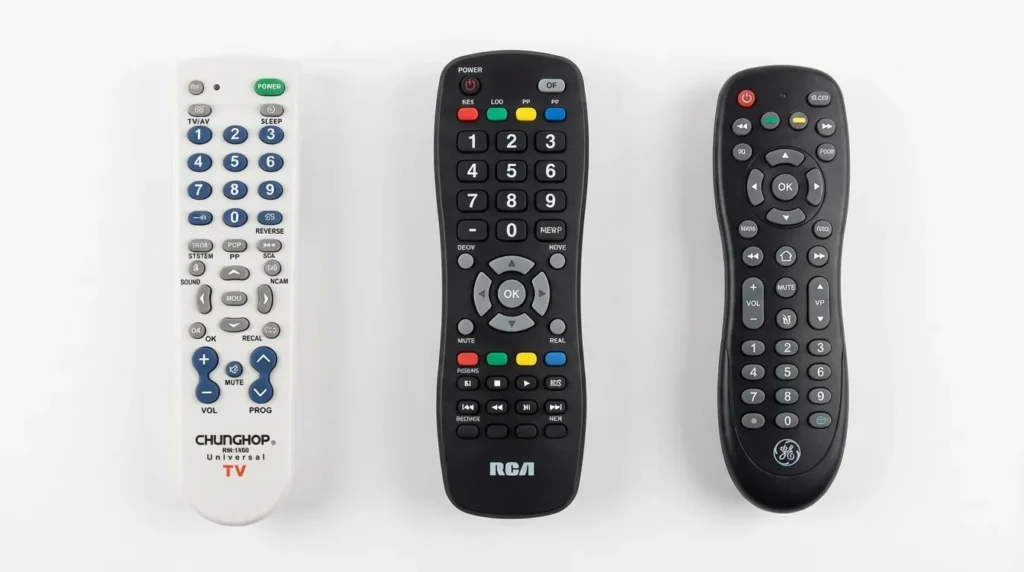
Common Chunghop Models
These are the models you’re most likely to have:
- RM-133E — One of the most common. Programs up to 8 devices.
- RM-L677 — Slim design. Good TV and cable box range.
- RM-L999 — Large button layout. Popular for media centers.
- RM-101E — Basic 1-device remote. Simple code entry.
- RM-L6+ — Backlit keys. Same programming method as RM-133E.
- RM-139E — Compact design. Frequently paired with budget TVs.
- RM-88E — Older model. Uses 3-digit codes, not 4-digit.
Important: If your remote is older (pre-2015), it likely uses 3-digit codes. Most current Chunghop remotes use 4-digit codes. Check the manual that came with your remote — or try both formats if you’re unsure.
How to Program a Chunghop Universal Remote
There are three ways to program it. Start with Method 1. If none of the codes work, move to Method 2 or 3.
Method 1 — Direct Code Entry
This is the fastest method when you know your brand’s code.
- Turn on the device you want to control (TV, DVD player, etc.).
- Point the Chunghop remote at that device.
- Press and hold the SET button until the LED light turns on and stays on.
- Press the TV button (or the button that matches your device type).
- Enter the 4-digit code using the number keys. The LED will blink once after each digit.
- After the 4th digit, the LED will blink twice if the code was accepted — or blink rapidly and go off if it was rejected.
- If accepted: press the POWER button to test. Your device should turn off.
- If the device turned off, the code is working. Press SET once more to save it.
- If the device didn’t turn off, go back to step 3 and try the next code on the list.
Note on the SET button: On some Chunghop models it’s labeled CODE or has a small lock icon. Same function, different label.
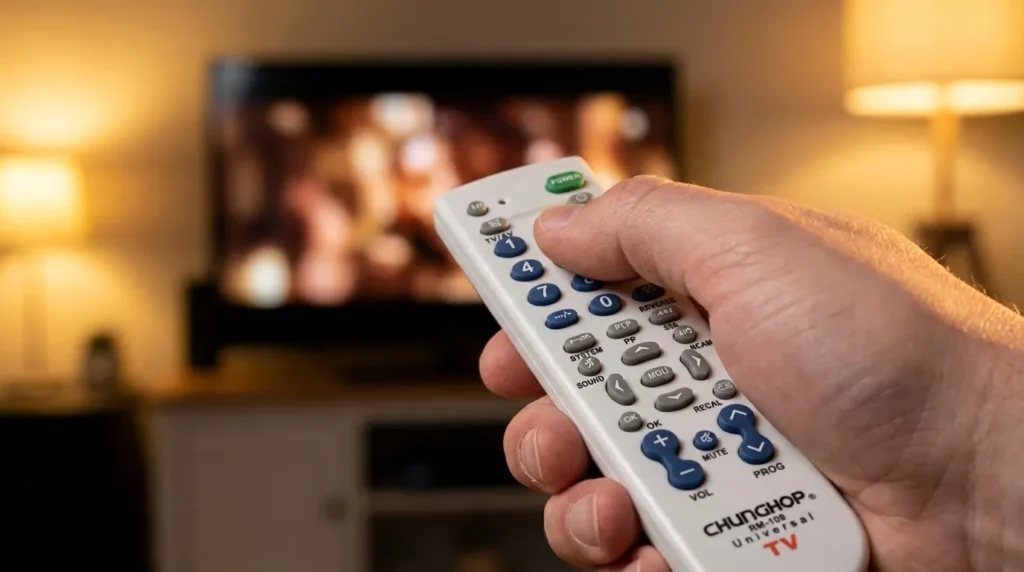
Method 2 — Auto Search Method
Use this when you don’t know the code or the code list didn’t work.
- Turn on the device you want to control.
- Press and hold SET until the LED stays on.
- Press the TV button (or the correct device button).
- Press and hold the POWER button on the remote. Do not let go.
- The remote will start scanning through codes automatically. Every 2 seconds it sends a new signal.
- Watch your device. When it turns off, immediately release the POWER button.
- Press SET once to save the code.
- Press POWER to test. The device should turn on and off correctly.
Tip: This method can take a few minutes. Don’t rush it. Stay aimed directly at the device’s IR sensor (usually near the bottom of the screen).
Method 3 — Manual Scan Method
This gives you more control than auto search. Useful when auto scan skips over the right code.
- Turn on the device.
- Press and hold SET until the LED stays on.
- Press the TV button (or the correct device button).
- Press POWER once. The LED will blink.
- Press CH+ to step forward one code at a time, or CH− to step backward.
- After each press, check if the device responds.
- When you find a code that works (device turns off), press SET to save it.
The same three-method structure applies to most major universal remote brands. If you use a Vivitar universal remote or a Blackweb universal remote, the auto-scan and manual scan steps follow the same logic.
Chunghop Universal Remote Codes for TVs
Use these with Method 1. Try each code in the list before switching to auto search. Multiple codes are listed per brand — newer TV models often need later codes in the list.
Samsung TV Codes
For a deeper look at Samsung-specific codes across multiple remote brands, the Samsung TV remote codes guide covers additional combinations.
| Code | Notes |
|---|---|
| 0217 | Most Samsung TVs 2010–2020 |
| 0490 | Samsung Smart TVs |
| 0512 | Older Samsung models |
| 0702 | Samsung LCD/LED |
| 0030 | Samsung CRT models |
| 0093 | Samsung plasma |
| 1907 | Some 2021+ Samsung |
LG TV Codes
| Code | Notes |
|---|---|
| 0178 | Most LG TVs |
| 0195 | LG Smart TVs |
| 0264 | LG OLED models |
| 0208 | LG LCD |
| 0403 | LG plasma |
| 1756 | LG 2020+ series |
| 0037 | Older LG models |
Sony TV Codes
Sony codes also appear in the Sony TV remote codes guide if you need cross-remote compatibility.
| Code | Notes |
|---|---|
| 0000 | Most Sony Bravia |
| 0013 | Sony LCD |
| 0087 | Sony CRT models |
| 0205 | Sony OLED |
| 0373 | Newer Sony models |
| 0463 | Sony XR series |
Vizio TV Codes
| Code | Notes |
|---|---|
| 0478 | Most Vizio TVs |
| 0556 | Vizio Smart TV |
| 0628 | Vizio D-series |
| 0030 | Older Vizio models |
| 1758 | Vizio M-series |
The Vizio universal remote codes page has additional codes if these don’t work for your model.
TCL TV Codes
| Code | Notes |
|---|---|
| 0478 | TCL Roku TVs |
| 0556 | TCL Android TVs |
| 0030 | Older TCL models |
| 0628 | TCL 4-series |
| 1898 | TCL 6-series |
Hisense TV Codes
| Code | Notes |
|---|---|
| 0556 | Most Hisense TVs |
| 0628 | Hisense ULED |
| 0030 | Older Hisense |
| 1874 | Hisense 2022+ |
| 0478 | Hisense Roku TV |
If the codes above don’t work, the Hisense TV remote codes guide has model-specific breakdowns.
Panasonic TV Codes
| Code | Notes |
|---|---|
| 0170 | Most Panasonic TVs |
| 0250 | Panasonic plasma |
| 0403 | Panasonic Viera |
| 0045 | Older Panasonic |
| 0143 | Panasonic LCD |
Sharp TV Codes
| Code | Notes |
|---|---|
| 0093 | Most Sharp TVs |
| 0217 | Sharp Aquos |
| 0000 | Older Sharp models |
| 0556 | Sharp Roku TV |
| 0702 | Sharp LED |
Philips TV Codes
| Code | Notes |
|---|---|
| 0205 | Most Philips TVs |
| 0009 | Philips Android TV |
| 0090 | Older Philips |
| 0465 | Philips OLED |
Toshiba TV Codes
| Code | Notes |
|---|---|
| 0156 | Most Toshiba TVs |
| 0093 | Toshiba LCD |
| 0000 | Older Toshiba |
| 0556 | Toshiba Fire TV |
Other TV Brand Codes
| Brand | Codes |
|---|---|
| Insignia | 0478, 0556, 0628 |
| Haier | 0093, 0478, 1786 |
| Sanyo | 0208, 0093, 0000 |
| RCA | 0030, 0217, 0178 |
| JVC | 0093, 0156, 0402 |
| Magnavox | 0205, 0009, 0156 |
| Emerson | 0093, 0478, 0402 |
| Hitachi | 0093, 0208, 0170 |
| Westinghouse | 0478, 0556, 0093 |
| Sceptre | 0478, 0093, 0030 |
| Element | 0093, 0478, 1874 |
| Skyworth | 0556, 0093, 1874 |
For Insignia, Element, Sanyo, and RCA codes tested across multiple universal remote brands, these dedicated pages go deeper: Insignia universal remote codes, Element TV remote codes, Sanyo universal remote codes, and RCA universal remote codes.
Chunghop Codes for DVD and Blu-ray Players
Press the DVD button (instead of TV) in step 4 of Method 1 when programming for a disc player.
Samsung DVD/Blu-ray Codes
| Code |
|---|
| 0490 |
| 0512 |
| 0702 |
| 0217 |
Sony DVD/Blu-ray Codes
| Code |
|---|
| 0000 |
| 0013 |
| 0205 |
| 0373 |
LG DVD/Blu-ray Codes
| Code |
|---|
| 0178 |
| 0195 |
| 0208 |
| 0264 |
Panasonic DVD/Blu-ray Codes
| Code |
|---|
| 0170 |
| 0045 |
| 0250 |
| 0143 |
Other DVD Brand Codes
| Brand | Codes |
|---|---|
| Toshiba | 0156, 0093 |
| Philips | 0205, 0009 |
| JVC | 0093, 0402 |
| Pioneer | 0402, 0156 |
| Magnavox | 0205, 0156 |
| Emerson | 0093, 0478 |
Chunghop Codes for Cable and Satellite Boxes
Use the CBL or SAT button in step 4 when programming for a set-top box.
Comcast / Xfinity Codes
| Code |
|---|
| 0463 |
| 0217 |
| 0490 |
| 0093 |
DirecTV Codes
| Code |
|---|
| 0178 |
| 0000 |
| 0208 |
| 0030 |
Dish Network Codes
| Code |
|---|
| 0512 |
| 0205 |
| 0156 |
| 0093 |
Other Cable/Satellite Provider Codes
| Provider | Codes |
|---|---|
| Cox | 0463, 0217 |
| Spectrum | 0490, 0178 |
| AT&T U-verse | 0217, 0702 |
| Spectrum / Charter | 0490, 0463 |
| Mediacom | 0217, 0093 |
If you use Spectrum equipment, the Spectrum universal remote codes guide and Spectrum TV remote codes page both have provider-specific programming steps.
Chunghop Codes for Soundbars and Streaming Devices
Soundbar Codes
Most soundbars respond to AUX or AMP device modes on Chunghop remotes.
| Brand | Codes |
|---|---|
| Samsung Soundbar | 0217, 0490 |
| LG Soundbar | 0178, 0195 |
| Sony Soundbar | 0000, 0013 |
| Vizio Soundbar | 0478, 0556 |
| Bose | 0205, 0009 |
| Yamaha | 0143, 0170 |
Bose systems sometimes need a more specific code sequence. The Bose universal remote codes guide covers additional Bose device types including Wave systems and home theater setups.
Streaming Devices
Chunghop remotes have limited compatibility with streaming sticks and smart TV operating systems. If your TV is a Roku TV, TCL Roku, or Hisense Roku model — use the TV codes above. For standalone Roku sticks, Fire Sticks, or Apple TV boxes, the Chunghop remote will not replace those dedicated remotes.
What to Do When No Code Works
If you’ve tried every code on the list for your brand and nothing works, use the auto-search method (Method 2 above). It cycles through the entire code library automatically.
A few things that help auto-search succeed:
- Sit within 10 feet of the device
- Aim directly at the IR sensor — not the screen
- Make sure fresh batteries are in the remote (weak batteries cause missed signals)
- Keep the room reasonably dark if possible — strong light can interfere with IR signals
If auto-search also fails, there’s a small chance your device model uses a non-standard IR protocol. Some newer smart TVs rely on Bluetooth or Wi-Fi for their original remotes and don’t accept infrared commands at all. In that case, a Chunghop universal remote is still a solid backup — but a replacement OEM remote may be the more reliable long-term fix.
Other universal remotes with larger code libraries may also be worth considering. The ONN universal remote codes guide and GE universal remote codes page are useful if you want to compare options.
Troubleshooting Chunghop Remote Problems
Remote Not Responding After Code Entry
Check three things in this order:
- Battery level — Low batteries are the most common reason. Replace with fresh AA or AAA (check your model). Even batteries that “seem fine” in other devices may be too weak for consistent IR output.
- IR sensor alignment — The device’s IR receiver is usually a small dark window near the bottom edge. Aim directly at it.
- Re-enter the code — If the SET step was interrupted, the code may not have saved properly. Repeat Method 1 from the beginning.
Code Works But Only Some Buttons Function
This is normal. A universal remote code gives you the core functions — power, volume, channel, input — but rarely maps every original button. If you’re missing a specific function, try a different code from the same brand list. Some codes unlock additional button functions on the same device.
Remote Loses Programming After Battery Change
Chunghop remotes store codes in non-volatile memory on most models made after 2012. If yours loses its programming after a battery swap, one of two things is happening:
- The batteries were removed while a button was held down, corrupting the save
- Your specific model is an older one that uses volatile memory
If it keeps happening, reprogram right after inserting batteries and test before powering the device off.
LED Blinks Rapidly and Goes Off During Code Entry
The code was rejected. This happens when:
- You entered a 3-digit code on a 4-digit remote (add a leading zero — e.g., 093 becomes 0093)
- The code number doesn’t exist in your model’s library
- There was a pause of more than 10 seconds between digit entries
Re-enter the code briskly without stopping between digits.
Volume Works But Channel Buttons Don’t (or Vice Versa)
The remote has locked onto a partial match in the code library. Try the next code for your brand. Codes further down the list often give better button coverage for specific model ranges.
This partial-function issue shows up with other universal brands too. The Durabrand TV remote codes guide and Dynex TV remote codes page both cover the same fix in detail if you want to cross-reference.
Frequently Asked Questions
Q: My Chunghop remote has a SET button and a TV button but they look different from what the guide describes. Will this still work?
Yes. The physical layout varies by model but the logic is the same: hold SET → press device type → enter code → test power. Button labels like MODE or CODE mean SET. The sequence doesn’t change.
Q: Can I program the Chunghop remote to control more than one device?
Yes, if your model supports it. The RM-133E and RM-L6+ handle up to 8 devices. Each device type (TV, DVD, CBL, etc.) stores its own code independently. Program each one separately using the same methods above.
Q: The code list doesn’t include my TV brand. What do I do?
Use Method 2 (auto search). It doesn’t require knowing the brand. If auto search also fails, your TV may use Bluetooth or a proprietary IR protocol that the Chunghop library doesn’t include. The Huayu universal remote codes page and Pilot universal remote codes guide are worth checking — both carry extended brand lists that may cover less common TV models.
Q: Does the Chunghop remote work with smart TVs?
It works with the basic functions — power, volume, input selection, channel change. Smart TV features accessed through the TV’s operating system (app launcher, voice search, home screen navigation) usually don’t work unless the code happens to map those buttons, which is rare.
Q: What’s the difference between 3-digit and 4-digit codes?
Older Chunghop models (generally pre-2013) use 3-digit codes. Newer models use 4-digit codes. If you have a 3-digit code and a 4-digit remote, add a zero at the front (e.g., 217 becomes 0217). If you have a 4-digit code and a 3-digit remote, it won’t work — you need the shorter code list for your model. The Zenith universal remote codes page is one example of a code set that includes both 3- and 4-digit formats for comparison.
Q: I programmed the remote successfully, but now it’s not working a week later. What happened?
Most likely a battery issue or accidental reset. Check the batteries first. Some models also have a reset button near the battery compartment — make sure it hasn’t been pressed accidentally. Reprogram using Method 1.
Conclusion
Chunghop remotes work with a huge range of devices, but the code entry step is where most people get stuck. The codes above cover the major TV, DVD, cable, and soundbar brands. If a code doesn’t work first try, it almost always means you need to try the next code on the list — not that the remote is broken.
Start with Method 1 and a fresh set of batteries. If you run through every code for your brand, switch to Method 2 and let the auto-scan do the work. Most devices lock in within a few minutes.
Once it’s programmed, it stays programmed. Your original remote can go back in the box.


