

The most reliable 4-digit code for Logik TV is 0016. If that doesn’t work, try 0060, 2135, or 1107. This page has every known working code — 3-digit, 4-digit, and 5-digit — plus step-by-step programming instructions for One For All, GE, RCA, Sky, and Philips remotes.
Logik is a UK budget brand sold through Currys PC World and Argos. The original remotes are no longer manufactured for most models, which makes universal remote setup the only practical option for most users in 2026.
Logik TV Remote Codes — Complete List
These codes cover all Logik TV models, including standalone TVs, TV/DVD combos, and VCRs. Start with the 4-digit codes — they have the highest success rate across Logik’s model range.
3-Digit Codes
| Code | Device |
|---|---|
| 016 | Logik TV |
| 072 | Logik VCR |
4-Digit Codes
| Code | Code | Code | Code |
|---|---|---|---|
| 0016 | 2135 | 0060 | 2107 |
| 1107 | 0011 | 1065 | 0908 |
| 1245 | 0726 | 0399 | 0039 |
| 0698 | 3719 | 1865 | 4226 |
| 0264 | 1795 | 1585 | 1037 |
| 2530 | 1645 | 2241 | 2095 |
| 2371 | 0037 | 4340 | 4218 |
| 0773 | 0009 | 3505 | 2673 |
| 2457 | 3030 | 0371 | 1702 |
| 0880 | 3432 | 3831 | 3802 |
| 0706 | 3005 | 2486 | 1687 |
| 1217 | 3428 | 1667 | 1626 |
5-Digit Codes
| Code | Code | Code | Code |
|---|---|---|---|
| 16440 | 11549 | 10644 | 10242 |
| 16630 | 17921 | 16263 | 15162 |
| 15934 | 16032 | 13523 | 12501 |
| 16940 | 17048 | 14216 | 16611 |
| 15320 | 15526 | 18029 | 14235 |
| 16915 |
5-digit codes are used by newer universal remotes, including recent Philips and One For All models. If your remote uses 5-digit codes, always start with 16440 or 11549.
Logik TV/DVD Combo Code
4-digit code: 2304
This applies to combo models including the L26DVDB10, L24DVDB19, L22DVDB11, and similar TV/DVD units. If 2304 fails on your combo, also try 0016 and 2135 — these work on some Logik combo models too.
Logik VCR Code
3-digit code: 072
Codes by Remote Brand
Different remote brands use different code databases. Find your remote brand below and use the codes confirmed for that device.
One For All (OFA) Remote Codes for Logik TV
One For All remotes are the most commonly used universal remote for Logik TVs in the UK. Use these codes with any OFA URC model.
4-digit OFA codes: 0016, 0698, 3719, 1865, 4226, 0264, 1795, 1585, 1037, 2530, 1645, 2241, 2095, 2371, 0037, 4340, 4218
5-digit OFA codes: 16440, 11549, 10644, 10242
The OFA models URC2062, URC2099, URC3065, URC2781, and URC2981 all have Logik codes in their databases. Start with 0016, and move down the list if it doesn’t pair. For full One For All code lists across all brands, see this guide to One For All universal remote codes.
GE Universal Remote Codes for Logik TV
4-digit GE codes: 0016, 0060, 1107, 0908, 1065, 0039
GE universal remotes use a standard direct code entry method. The code 0016 is the most consistent starting point for Logik across all GE remote models. A complete breakdown of programming steps is available in this GE universal remote codes guide.
RCA Universal Remote Codes for Logik TV
3-digit RCA codes: 016
4-digit RCA codes: 0016, 2135, 0060, 1107
RCA remotes typically use 3 or 4-digit codes depending on the model. Older RCA remotes need 3-digit codes — use 016 first. For the full RCA code database and programming instructions, check this RCA universal remote codes page.
Sky / YouView / Plusnet Remote Codes for Logik TV
This is one of the most-searched topics for Logik TV users in the UK — and one almost no other guide covers.
Sky remotes (Sky Q and older Sky+HD) do not have a standard Logik entry in their manufacturer database. However, the following approaches have been confirmed by UK users:
- Try Samsung codes on your Sky remote. Sky remotes support Samsung TV codes because Logik TVs share chipsets with Samsung units. On a Sky Q remote, go to Settings → My Sky → Remote Control → Set up Remote, then enter the Samsung TV code.
- Sky Q remote: Use manufacturer codes 2170, 0060, or 0030 under the Samsung device category.
- YouView remote (BT/Plusnet): Try codes 0001, 0031, or 1293 under the Logik or Samsung device option.
If you’re setting up Sky alongside a Logik soundbar, the process is slightly different — the remote needs to control audio output separately.
Philips Universal Remote Codes for Logik TV
4-digit Philips codes: 0016, 0060, 2135, 0726
5-digit Philips codes: 16440, 11549, 16630
Philips SRP and SJM-series remotes support both 4 and 5-digit code entry. Use the 5-digit codes if your Philips remote has a 5-digit code mode. The full list of programming steps for Philips devices is covered in this Philips universal remote codes guide.
How to Program a Universal Remote to a Logik TV
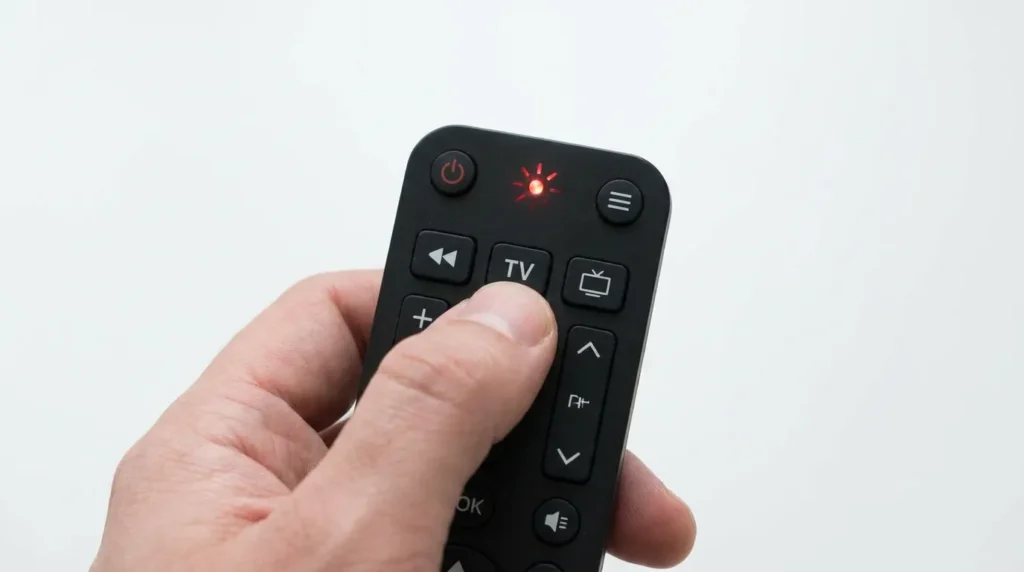
Three programming methods work with Logik TVs. Method 1 is fastest if you already have a code. Method 2 works when you don’t. Method 3 is specific to One For All remotes.
If you’re unsure which code to use, the Remote Code Finder tool can help you identify the right code for your remote model and TV brand before you start.
Method 1 — Direct Code Entry
- Turn on your Logik TV manually.
- Press and hold the TV button on your universal remote for 3 seconds until the LED stays on.
- Enter the 4-digit code (start with 0016).
- The LED will turn off when the code is accepted.
- Press the Power button. If the TV turns off, the code works.
- Press Power again to turn the TV back on and test volume and channel buttons.
- If the TV doesn’t respond, repeat from Step 2 with the next code on the list.
Method 2 — Auto-Search (Code Scan)
Use this when no specific code is working.
- Turn on your Logik TV.
- Press and hold the TV and OK/SEL buttons together for 3 seconds until the LED turns on.
- Point the remote at the TV. Press CH+ one press at a time — slowly.
- The remote cycles through codes automatically, sending a power-off signal with each one.
- When the TV turns off, stop pressing.
- Press Power to confirm. If the TV turns back on, press OK to save the code.
- Test volume and channel buttons to confirm full function.
This method takes longer but finds working codes that aren’t in any published list.
Method 3 — One For All MAGIC Button Method
This is specific to One For All URC remotes.
- Turn on your Logik TV.
- Press and hold the MAGIC button until the LED blinks twice.
- Press the TV device button.
- Enter the 4-digit Logik code (start with 0016).
- The LED will blink twice to confirm.
- Press Power to test. If the TV turns off, press MAGIC to lock the code.
If the code doesn’t work, repeat and try the next code on the OFA list above.
Compatible Logik TV Models
These codes are confirmed to work across the following Logik model numbers:
Logik TV models: L22FED12 / L24FED12 / L26HED12 / L32HE12 / L32HED12 / L39FE12 / L46FE12 / L22FED13 / L24FED13 / L32HE13 / L32HED13 / L19HED12 / L19HED14 / L20HE18 / LOG37LW427 / LOG32LW782 / L32LW783 / L40LCD11 / L40DIGB20 / LCXW32HD1 / LCXW37HD1 / LCXW30NN6 / LCX17LN2 / LCXW23NT4 / LOG19WHD17 / L25MDM13 / LCXW19LN2D / LCX27WN2 / L32DIGB20 / L323CD11 / L323ED11 / L423CD11 / L473CD11 / LLCD55FHD / L23IP11
Logik TV/DVD Combo models: L19DVDB10 / L19DVDB11 / L19DVDB20 / L22DVDB10 / L22DVDB11 / L22DVDB19 / L22DVDB20 / L24DVDB11 / L24DVDB19 / L24DVDB21 / L26DVDB10 / L26DVDB11 / L26DVDB20 / L26DVDB21 / L32DLCD11
Logik DVD/VCR models: L19LDVB11 / L19LDVP11 / L19LDVN11 / L22LDVB11 / L22LDVB19 / L22LDVB21 / L26DIGB10 / L26DIGB11
If your model isn’t listed, try the codes anyway — Logik used a small number of chipsets across its entire range, so the codes transfer between models more often than not. You can also use the TV Model Number Decoder to understand what your model number refers to.
Codes Not Working? Do This First
The most common reason Logik TV codes fail is a drained battery causing weak IR signal. Replace the batteries in your universal remote before trying any other fix.
Try Samsung Codes Instead
Logik TVs were manufactured using Samsung-sourced components and share the same IR chipset on many models. This means Samsung universal remote codes often work on Logik TVs even when Logik-specific codes fail.
Try these Samsung 4-digit codes on your universal remote: 0060, 0030, 0178, 0587, 0217.
For a complete set, see the full Samsung TV remote codes list.
Run an Auto-Scan
If specific codes aren’t working, switch to the auto-search method (Method 2 above). Auto-scan cycles through hundreds of codes automatically, including codes not published in any standard list. This is the most reliable fallback.
Reset Your Remote First
Some universal remotes develop memory errors after failed code attempts. A factory reset clears them.
One For All reset:
- Open the battery compartment and remove all batteries.
- Hold any button on the remote for 10 seconds to discharge it fully.
- Re-insert batteries.
- Press 2 + 8 simultaneously within 6 seconds of the LED blinking.
- Enter 9 8 1. The LED blinks four times to confirm the reset.
After resetting, start the programming process again from scratch.
HDMI CEC — Skip the Code Entirely
If your Logik TV has an HDMI port and you’re using a streaming device (Amazon Fire Stick, Roku, Apple TV), you may not need a universal remote code at all.
HDMI CEC lets compatible devices control TV power and volume through the HDMI cable. Enable it on both your Logik TV and your streaming device. Your streaming device’s remote will then control basic TV functions — power on/off and volume — without any code entry.
On most Logik TVs, HDMI CEC is found under Settings → System → HDMI Settings. The option may be labelled “HDMI Control” or “Anynet+” depending on the firmware version.
This won’t replace a full universal remote, but it works well if your primary need is controlling a streaming device from one remote.
When No Code Works — Replacement Remote Options
If you’ve tried every code on this page and auto-scan hasn’t found a match, the IR receiver on the TV may be faulty — or the remote itself may not support Logik’s frequency range.
A dedicated universal remote control designed for UK TV brands will have a broader code database and a better chance of pairing with older Logik models. One For All’s Zapper and Contour series are the most commonly recommended options for Logik TVs in the UK.
Before buying a replacement, confirm your TV’s IR sensor is working by pointing a smartphone camera at the TV’s sensor area while pressing buttons on another remote — a working IR sensor shows as a light pulse through the phone camera.



Hello i wonder if possible could you provide me with the 4 diget code for my TV as i am lost without any stations LOGIK MODEL L32HE17,,,SERIAL No 1742004000, if possible thank you.